All work

Address Validation Experience

A scalable address validation system that improved data accuracy, payment reliability, and regulatory compliance.

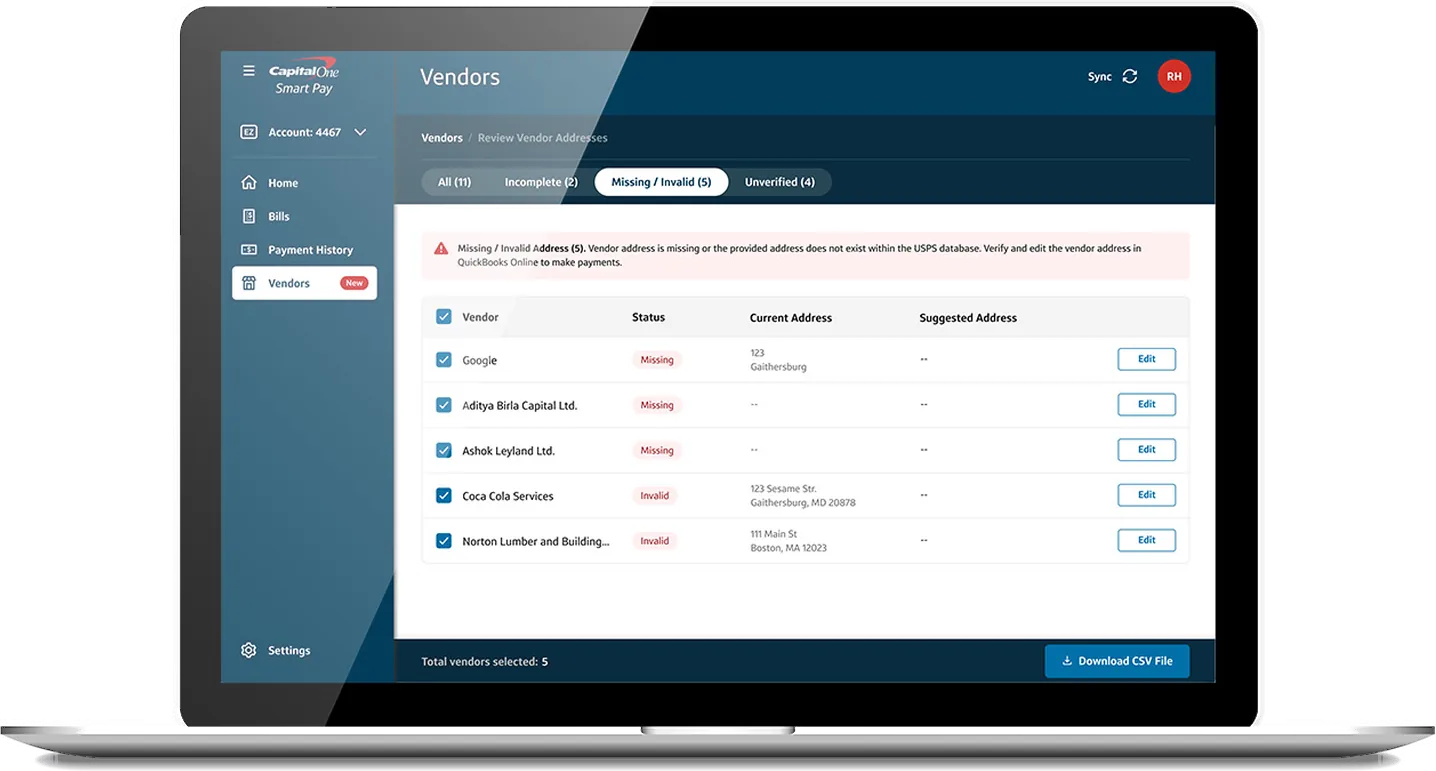
Capital One vendor address review on a laptop
Client
Capital One
Role
Senior Product Designer
Product
Smart Pay, after the MVP launch
Scope
Edge cases · Compliance · Fintech · B2B

To comply with my non-disclosure agreement, I’ve omitted confidential information. The data featured here is my own and does not reflect Capital One’s views.

The problem

Bad vendor addresses were putting payments at risk.

After the Smart Pay MVP launched, address quality emerged as a critical risk. Vendor addresses synced from QuickBooks Online were often incomplete, inconsistently formatted, or invalid, which directly affected payment reliability and compliance. And users couldn’t edit vendor addresses in Smart Pay at all.

Validation had to be introduced carefully: better data quality, without more friction for users or unnecessary engineering complexity.

Key challenges

  • When to validate: in bulk during onboarding, or one record at a time during bill pay
  • A clear experience for reviewing and correcting addresses
  • QuickBooks syncing limits that prevented in-app edits
  • A scalable system, not a one-off fix

The opportunity

  • Validate addresses earlier in the workflow to make payments more reliable
  • Standardize addresses to USPS formatting
  • One system for both bulk and single-address validation
  • Groundwork for in-app editing once the Vendors section launched

My role

As senior product designer, I guided the design process end to end, from early research through user testing and high-fidelity prototypes. I partnered closely with product managers, front- and back-end engineers, and compliance stakeholders, and supported junior designers to keep the approach consistent and user-centered.

Approach

Designed for today’s constraints and tomorrow’s Vendors section

01Three address states, not two

We chose SmartyStreets as the verification service. It validates against USPS data and a large proprietary database, so we could clean, correct, and standardize addresses in single and bulk validation. Analysis of how address quality affected bill payments then revealed three meaningful states. That moved the design away from a simple valid or invalid model toward a system that guides users through corrective actions.

Valid

Complete, standardized, and ready for payment.

  • Complete, valid, and standardized
  • A marginally different suggestion, like an appended zip code

Fixable

Incomplete or non-standard, but with a suggested match.

  • Incomplete, but SmartyStreets found a matching suggestion
  • Bills can still be paid

Invalid

No match found, so the bill can’t be paid.

  • Incomplete, with no SmartyStreets match
  • Invalid or missing address
02One pattern, before and after Vendors

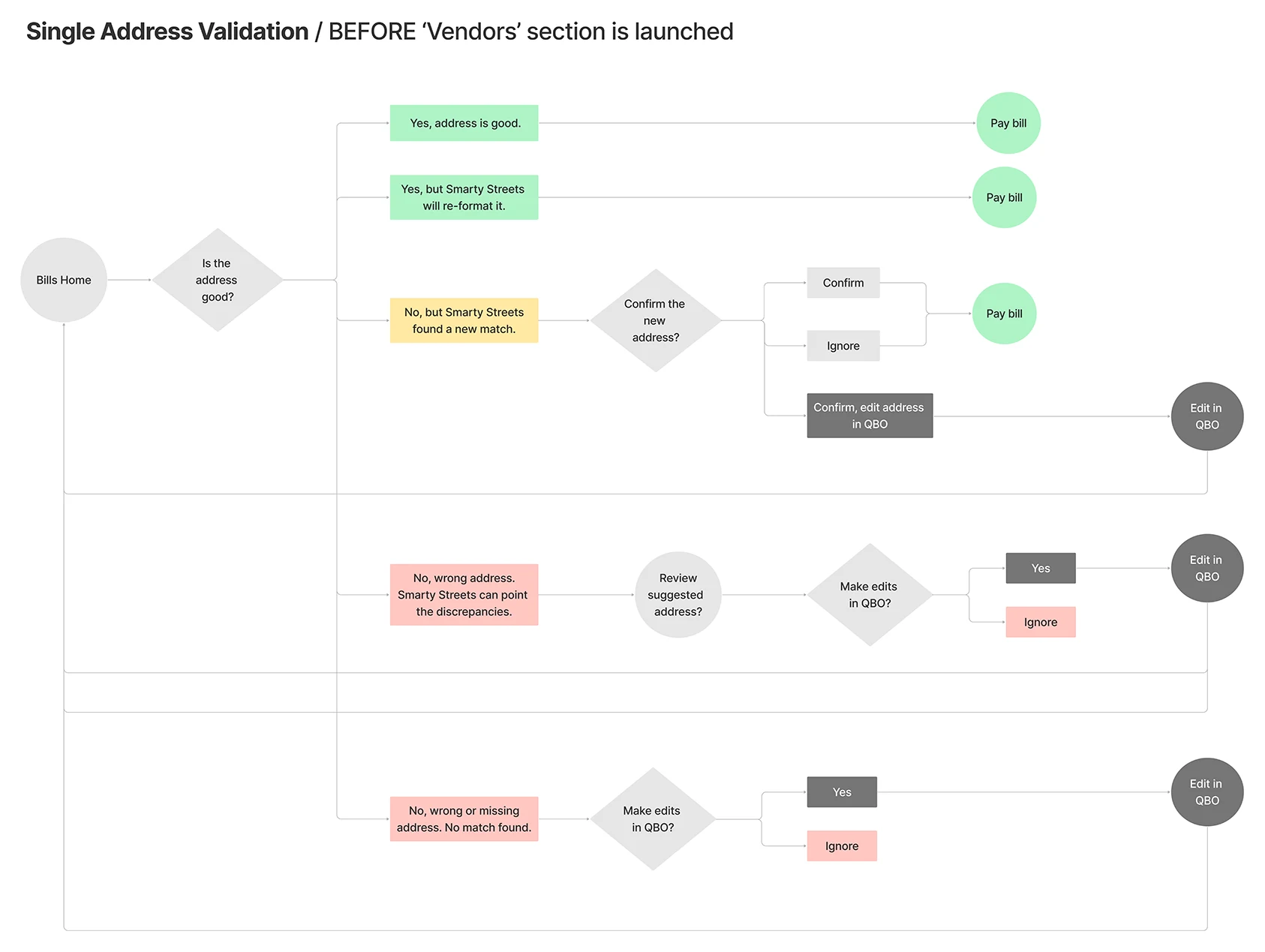
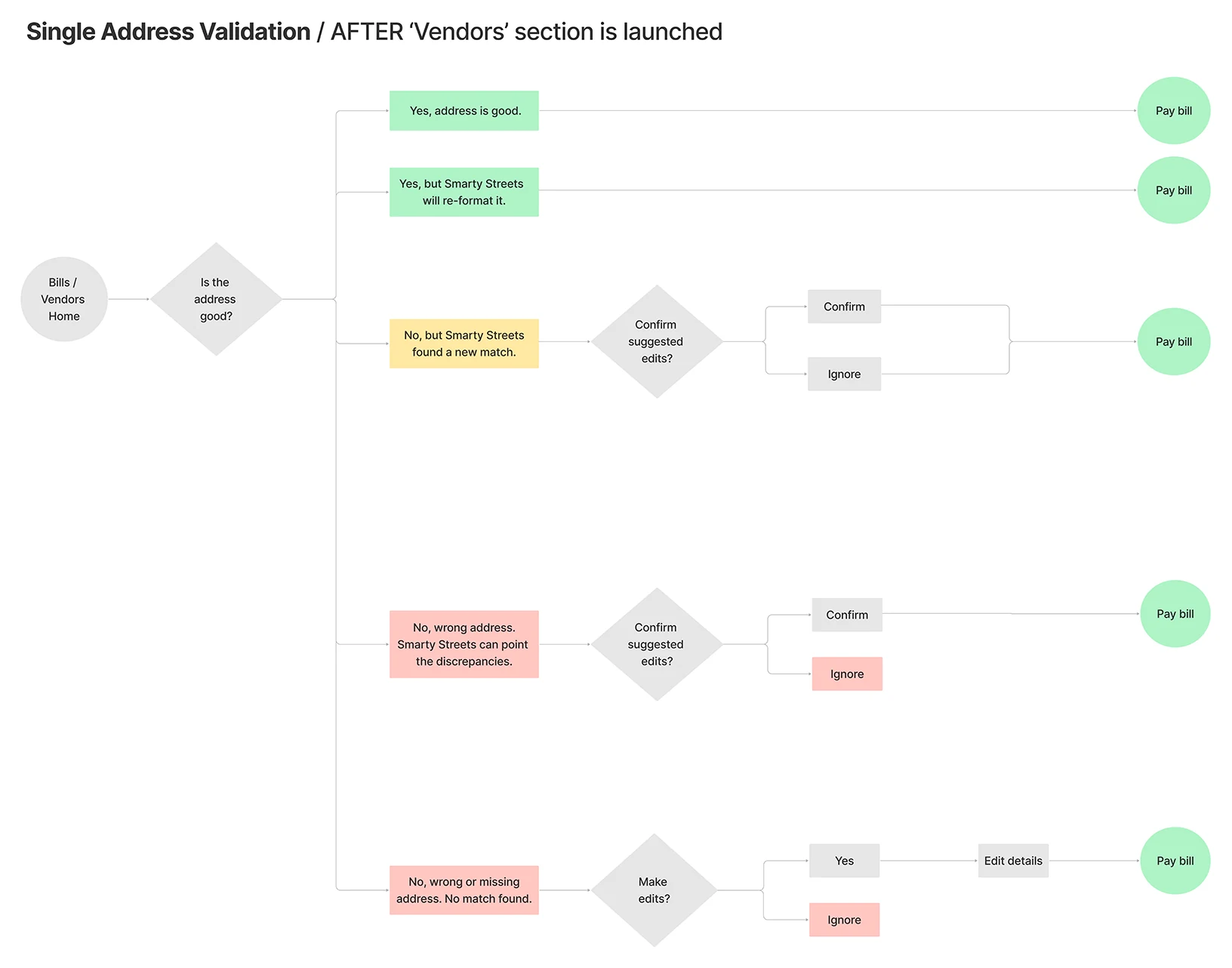
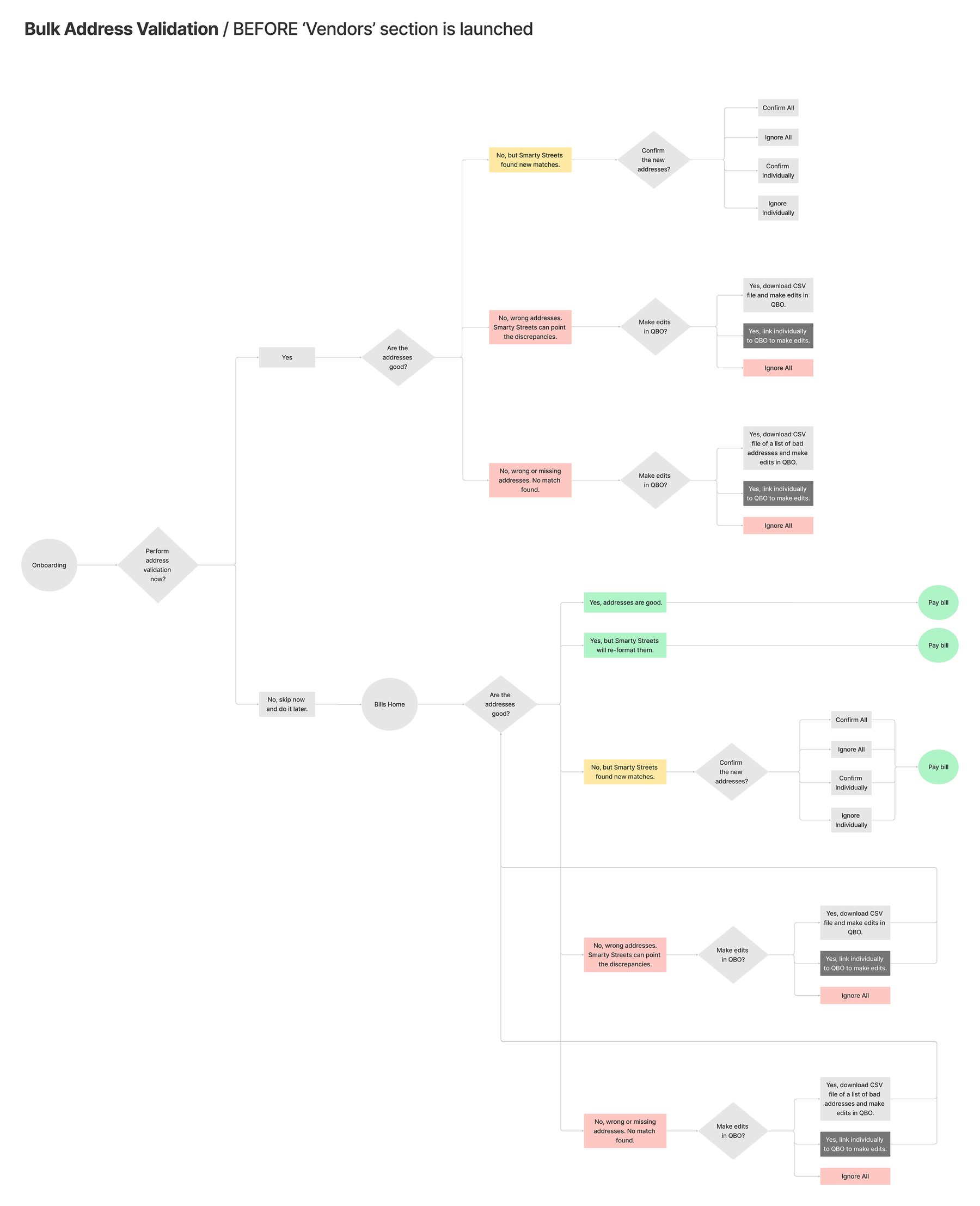
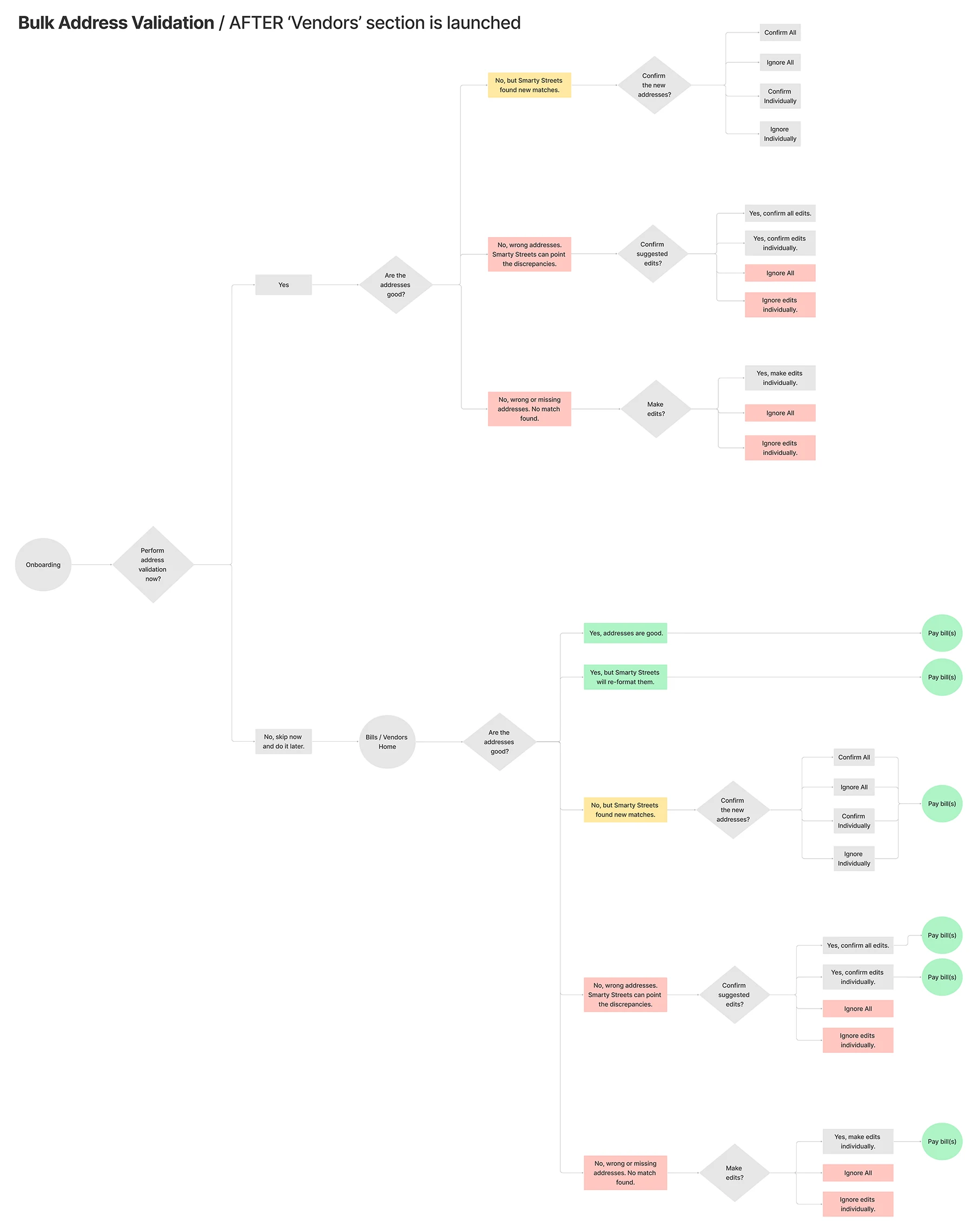
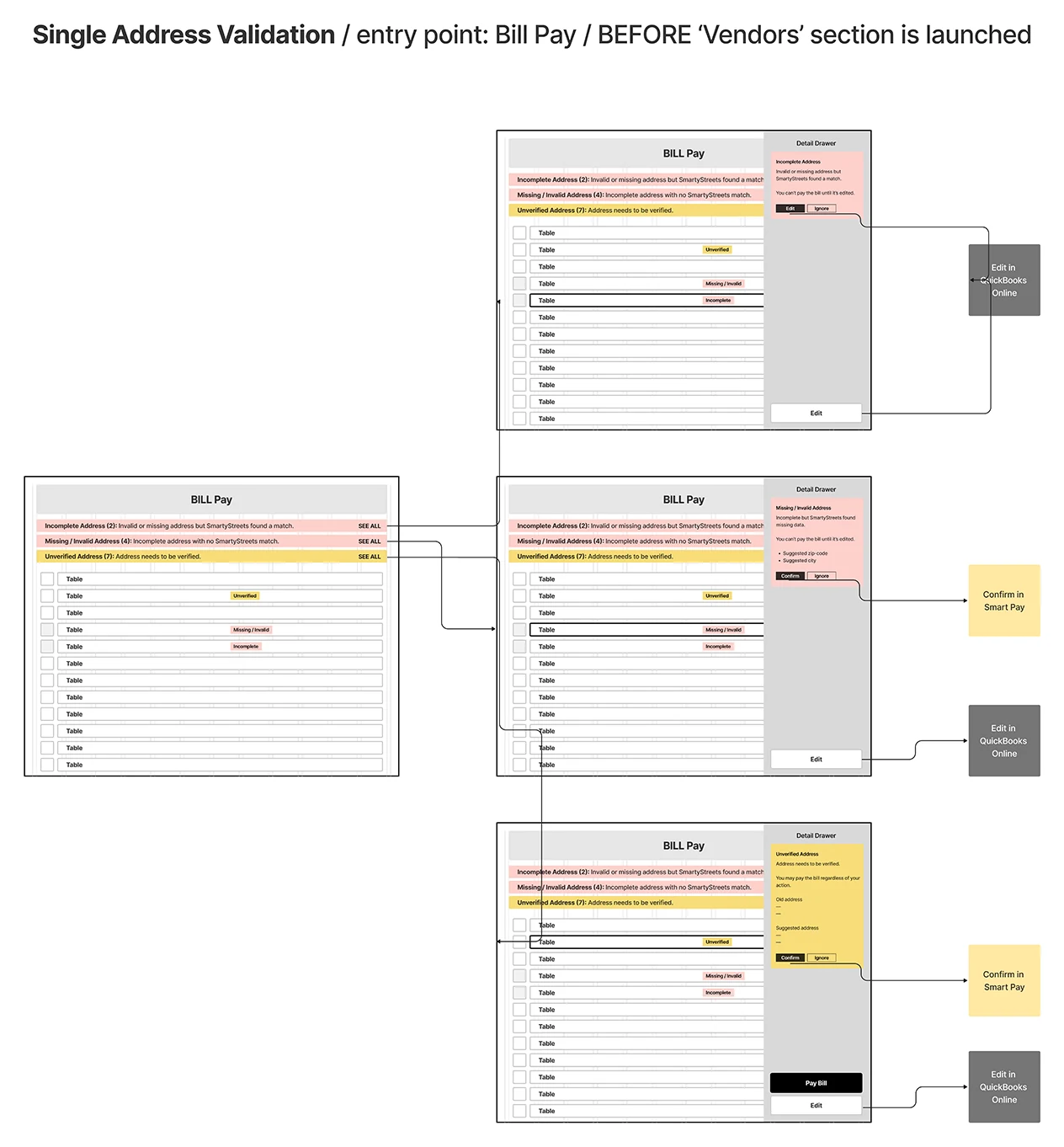
The Vendors section would soon allow address edits inside Smart Pay. Rather than design a temporary workaround, we mapped every flow twice, before and after Vendors, so the same patterns could evolve naturally once in-app editing arrived.

Single address validation flow before Vendors, with edits made in QuickBooks Online

01Before Vendors

Single address validation flow after Vendors, with edits made in Smart Pay

02After Vendors

Single address validation, before and after Vendors.Before, fixes route to QuickBooks Online and sync back. After, the same decisions end in Smart Pay, with every path leading to a payable bill.
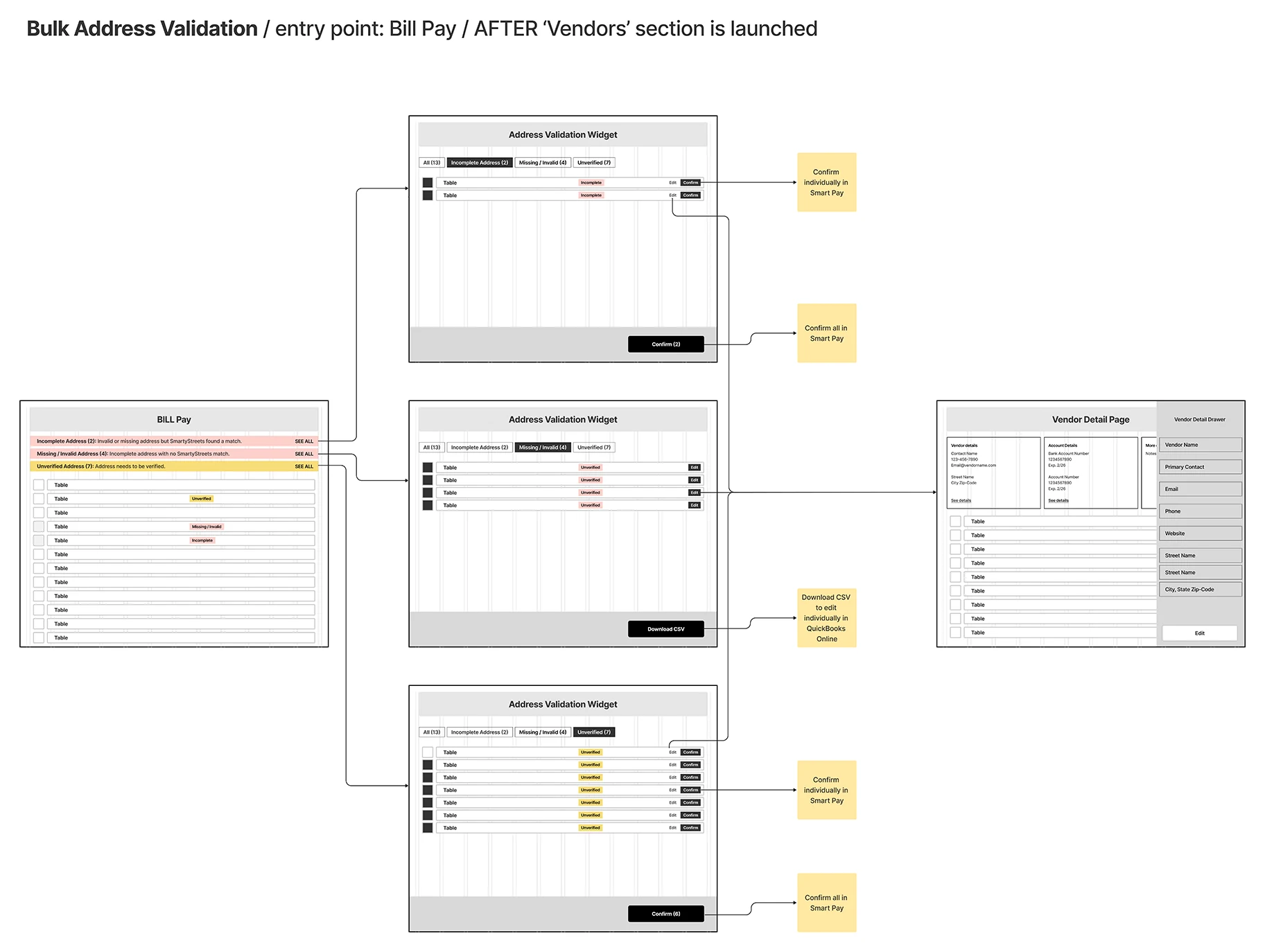
Bulk address validation flow before Vendors, from onboarding or Bills home, with edits made in QuickBooks Online

01Before Vendors

Bulk address validation flow after Vendors, from onboarding or Bills and Vendors home

02After Vendors

Bulk address validation, before and after Vendors.Users can validate during onboarding or skip and do it later. Before, wrong or missing addresses are fixed in QuickBooks Online, through a CSV download or a link per vendor. After, the same decisions are resolved in Smart Pay. Either way, suggested matches can be confirmed or ignored, all at once or one by one.

03Testing the timing, the volume, and the words

After finalizing the flows, we wireframed and tested the key questions, then refined the designs with product and engineering.

  • The best moment to verify: onboarding or bill pay checkout
  • Feasibility of bulk versus single-address validation
  • How well the messaging and guidance worked
  • Whether users expected to edit addresses in QuickBooks or in Smart Pay
Single address validation wireframes from Bill Pay before Vendors

01Single address, before Vendors

Bulk address validation wireframes from Bill Pay after Vendors, leading to the vendor detail page

02Bulk, after Vendors

Alerts, a details drawer, and one reusable widget.Alerts above the Bills table lead to the details drawer for a single bill. For bulk, one widget groups issues into categories with individual and bulk actions, reused across Bills, onboarding, and Vendors.

Outcome

One validation experience across every entry point

The final solution standardized address validation across Bills, onboarding, and Vendors, and adapted as product constraints changed.

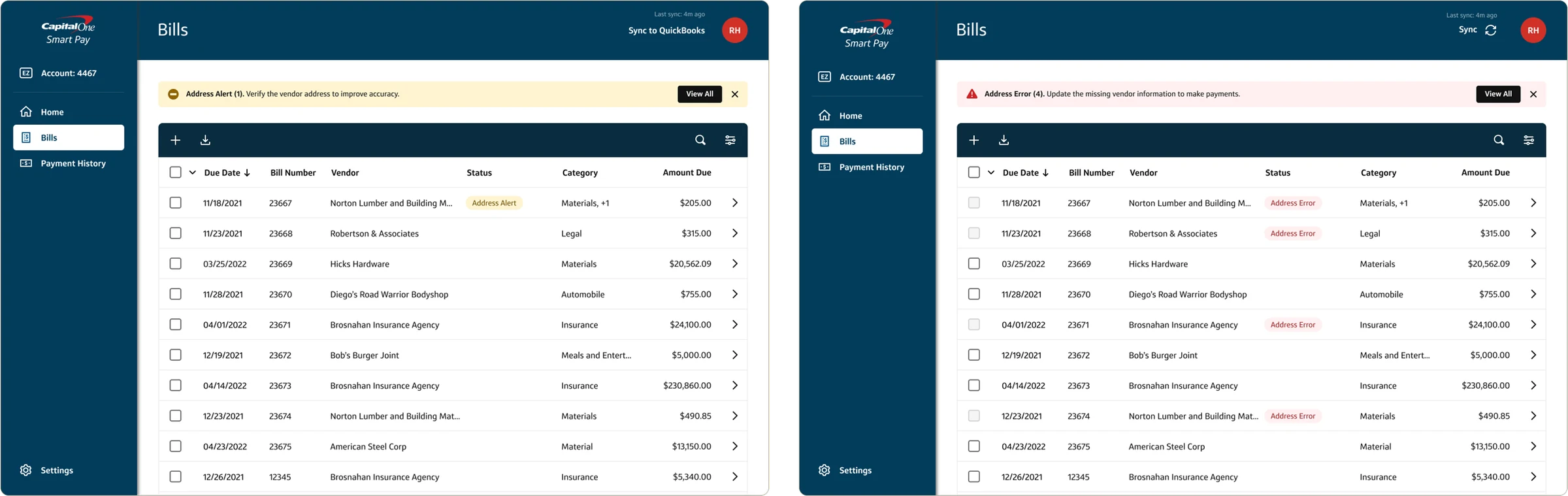
Bills table with an Address Alert above the table, and with an Address Error alert and error badges
Address issues surfaced above the Bills table.An Address Alert asks users to verify a vendor address, while an Address Error flags bills that can’t be paid until it’s fixed.
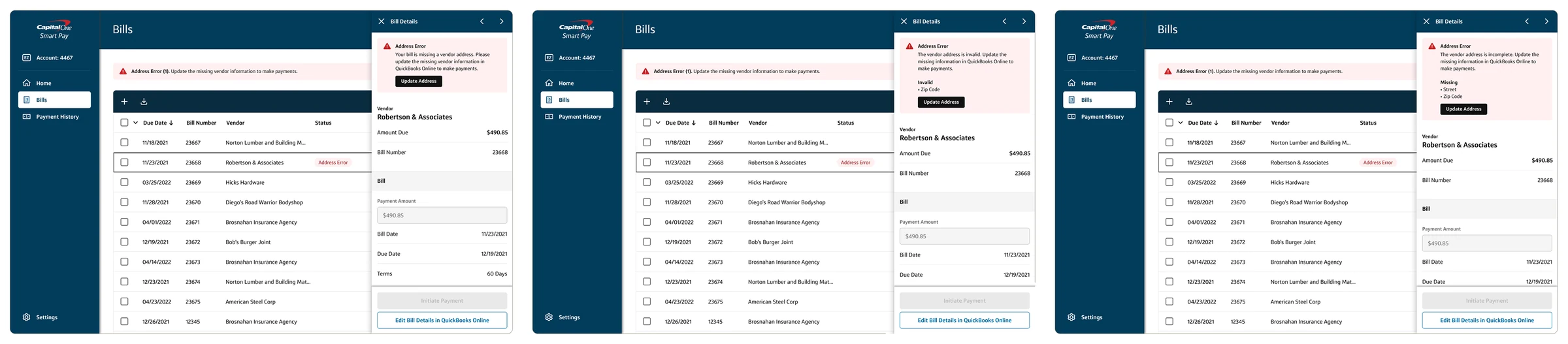
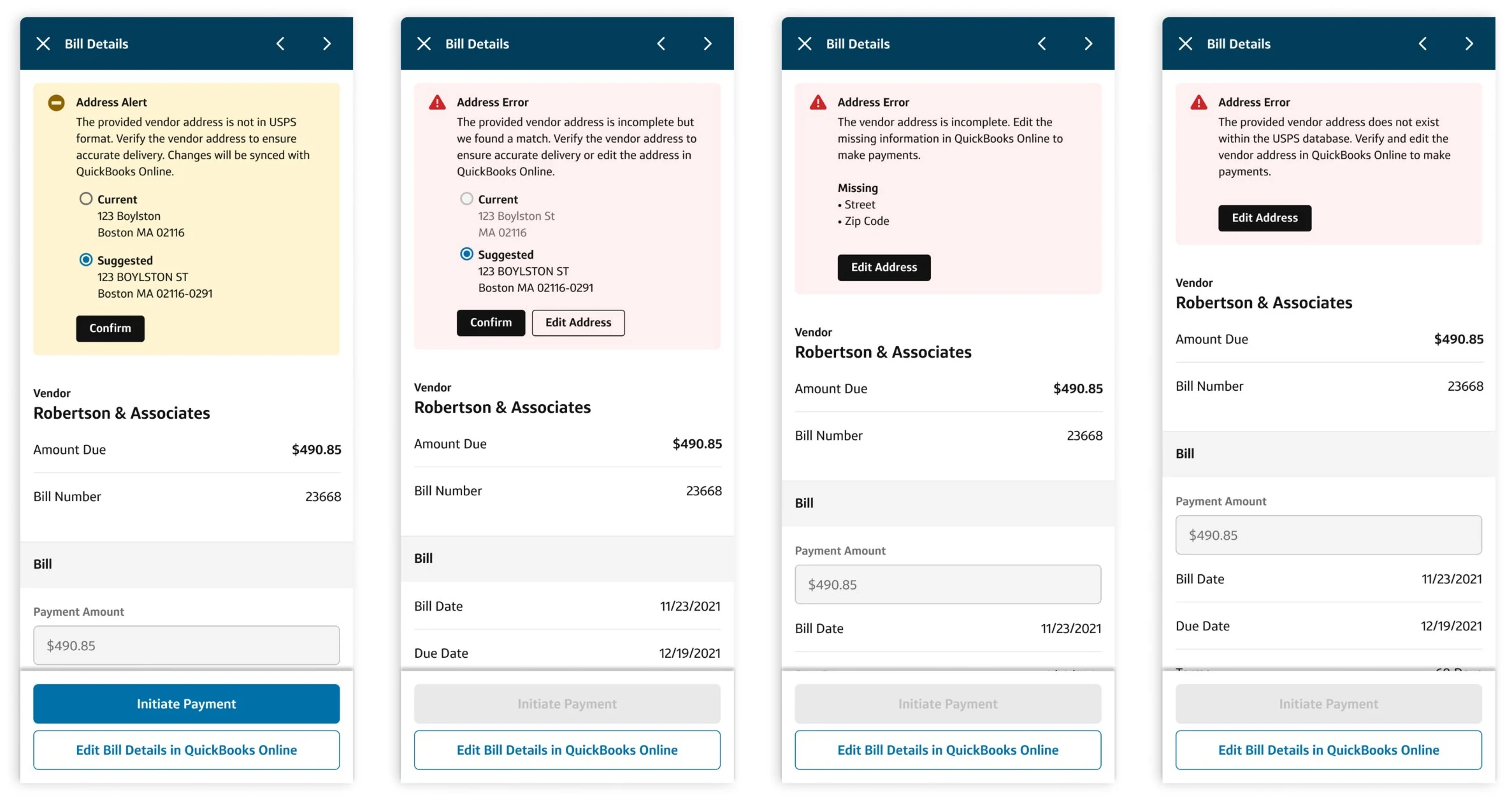
Bill detail drawers with missing, invalid and incomplete vendor address errors
The drawer explains what’s wrong and how to fix it.Missing, invalid, or incomplete: each error names the fields at fault, and payment stays disabled until the address is updated.
Four bill drawers: an Address Alert with a suggested address, and three Address Error variants
A suggested match whenever one exists.Users compare the current and suggested address and confirm in one step, or edit the address when no match is found.
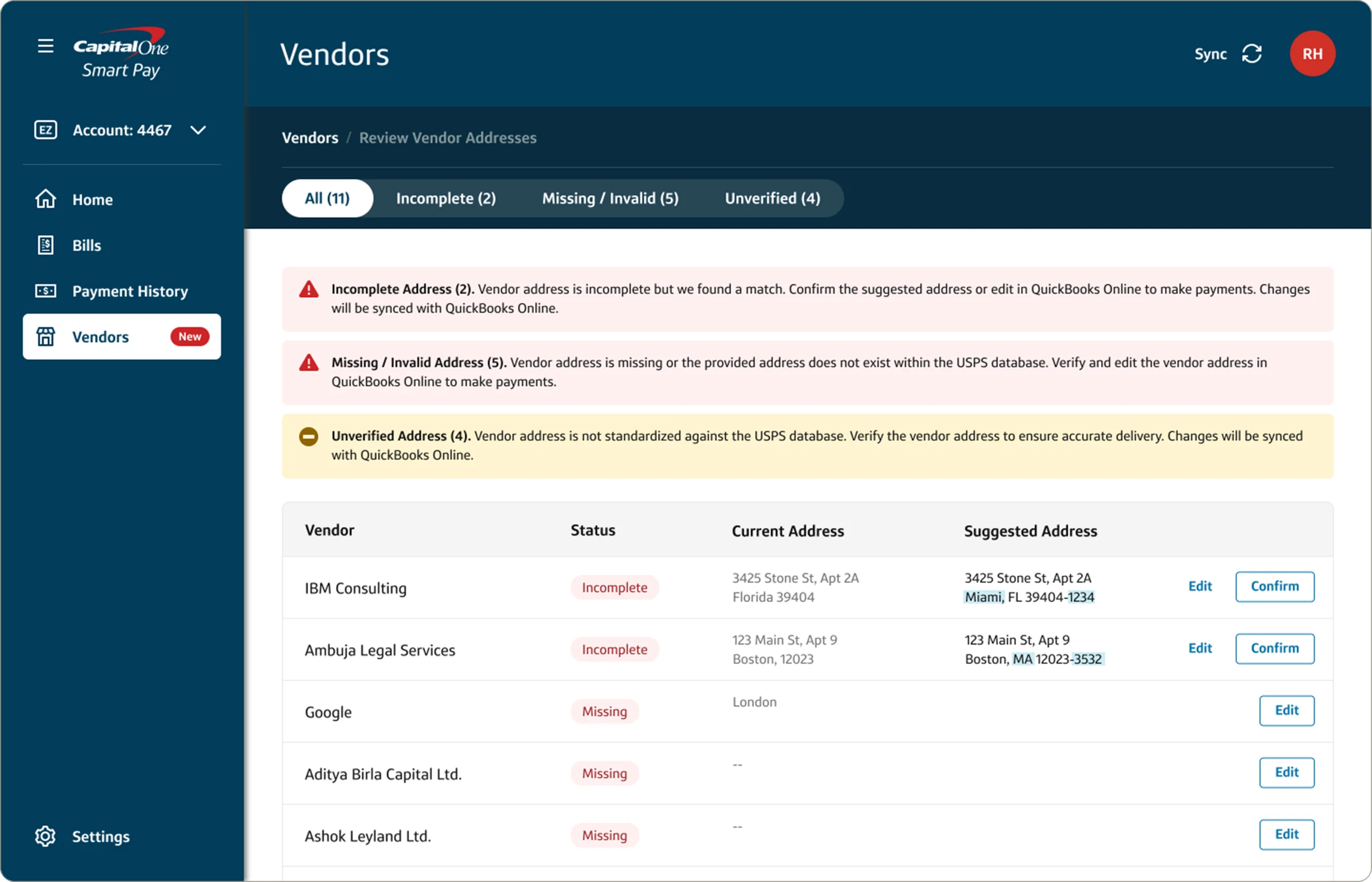
Review Vendor Addresses page with incomplete, missing or invalid, and unverified alerts and suggested addresses
Bulk review in a single view.The validation widget groups issues by type, with current and suggested addresses side by side and the changed parts highlighted.
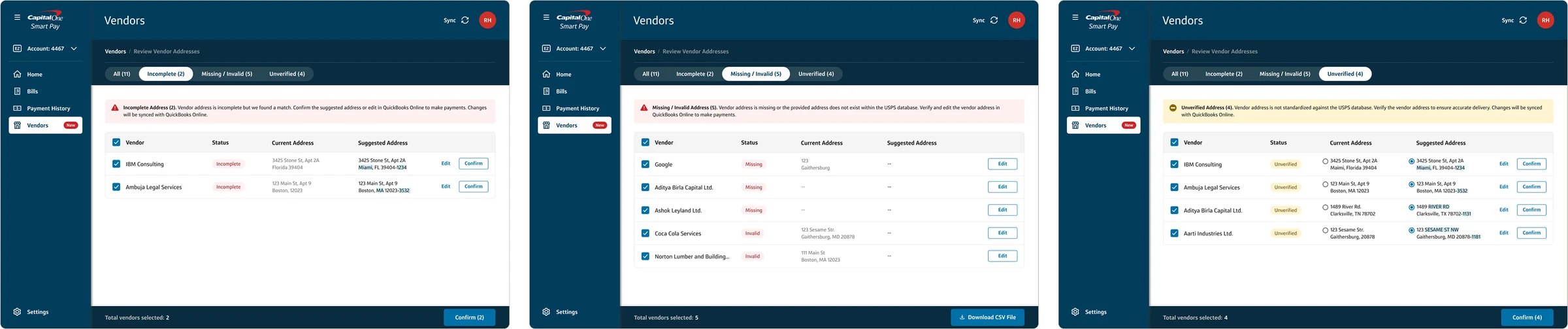
Review Vendor Addresses filtered to Incomplete, Missing or Invalid, and Unverified, with batch actions
Batch actions for each type of issue.Confirm all suggested matches at once, or download a CSV of addresses that need editing in QuickBooks Online.

Integration with Vendors

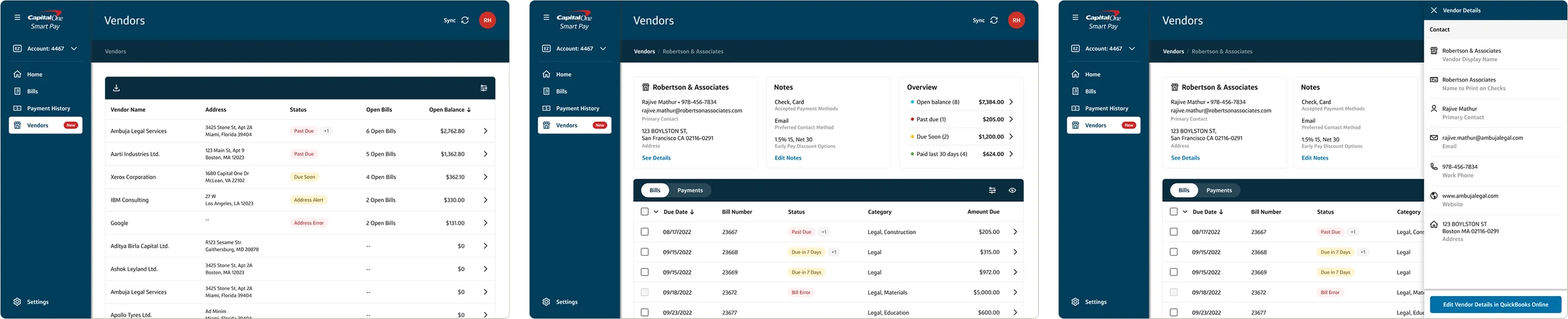
When the Vendors section launched, it reused the same components and patterns, so users could view and manage every address issue, edit addresses directly in Smart Pay, and see validation feedback in real time.

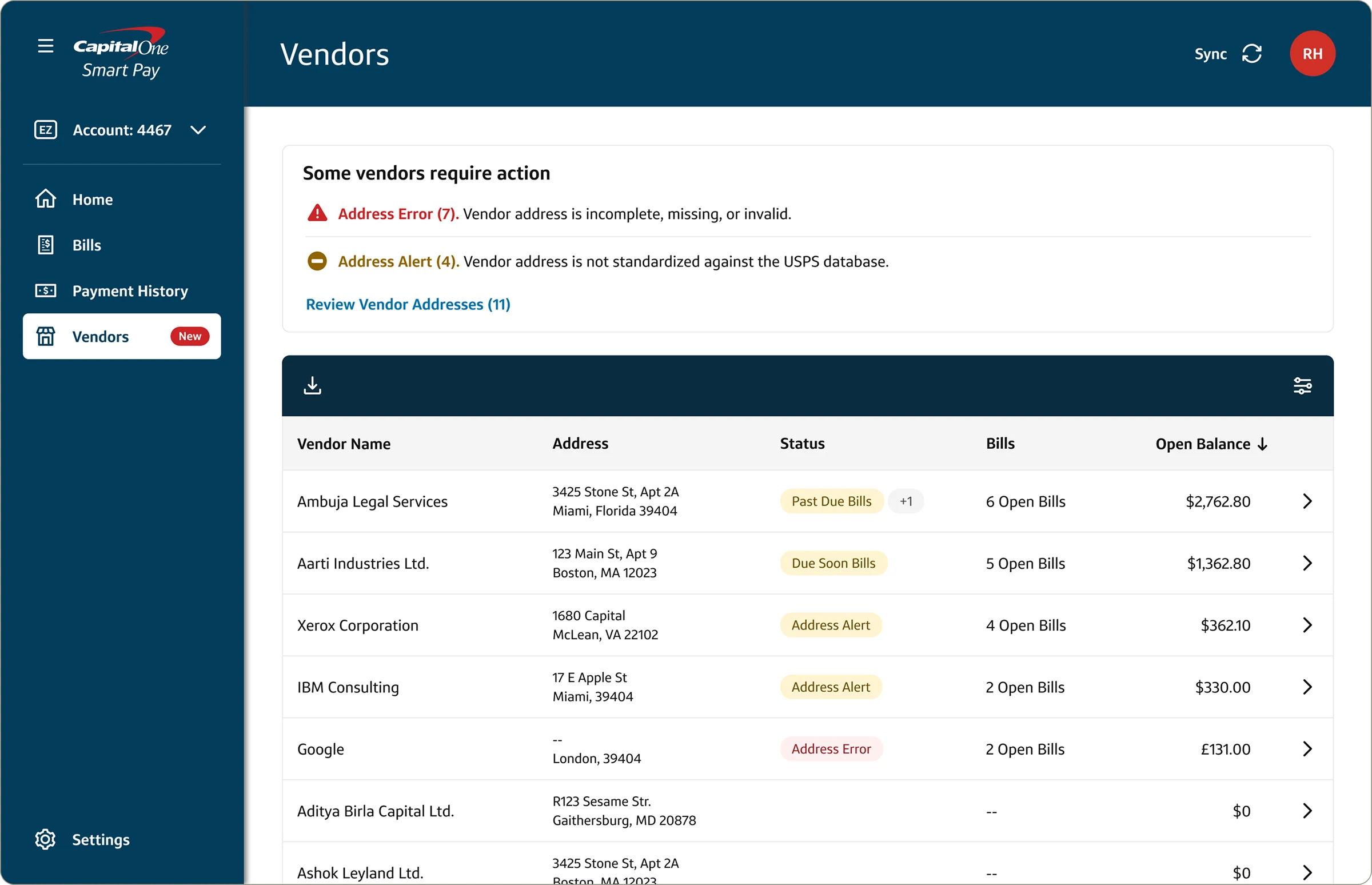
Vendors list with a Some vendors require action summary of address errors and alerts
Address health at the top of Vendors.A summary of address errors and alerts links straight to the review page, and each vendor shows its status alongside open bills and balance.
Vendors list, vendor detail with notes and overview, and the vendor details drawer
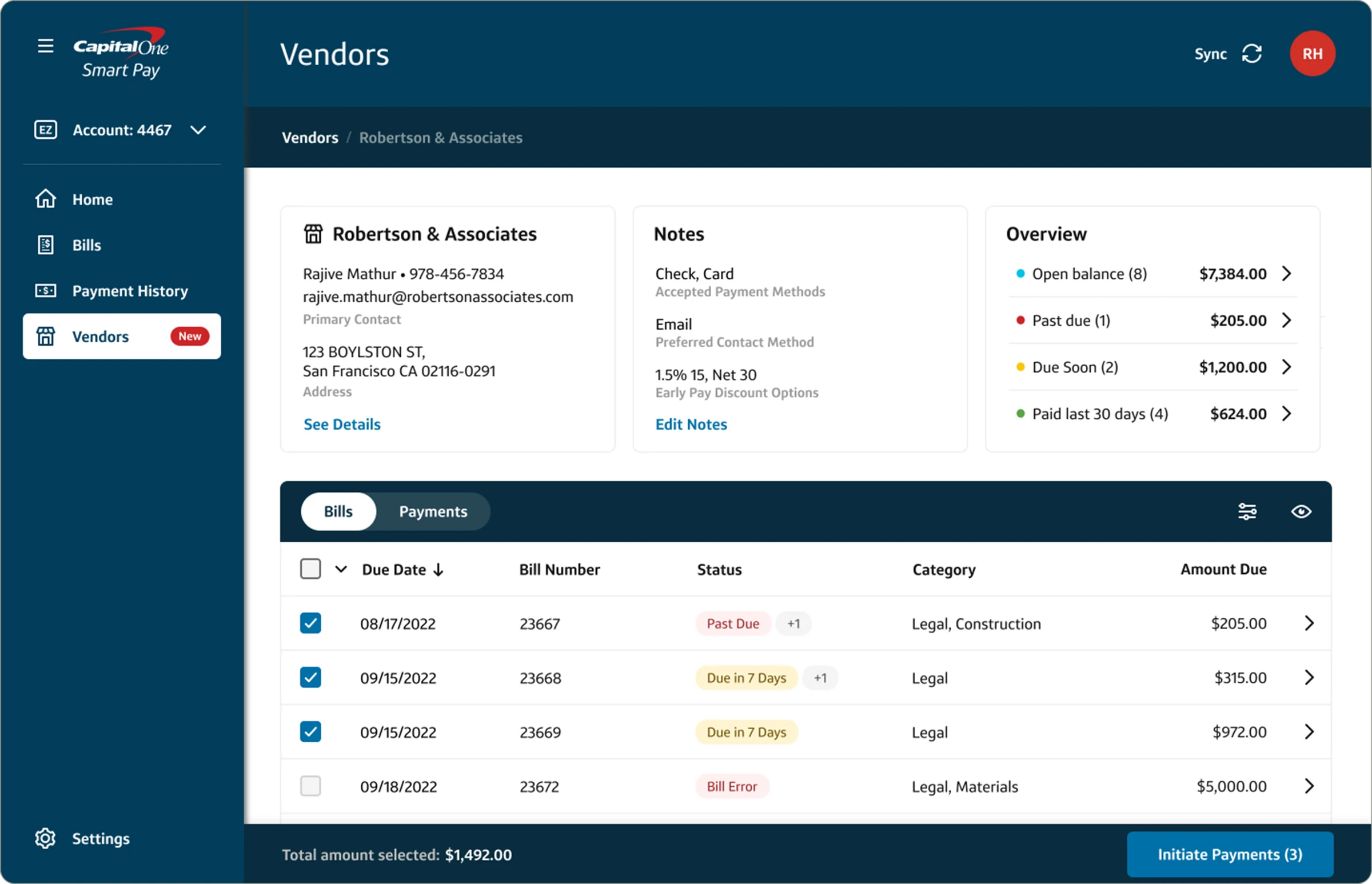
From vendor list to vendor details.Each vendor page brings contact details, notes, an overview of balances, and their bills and payments together.
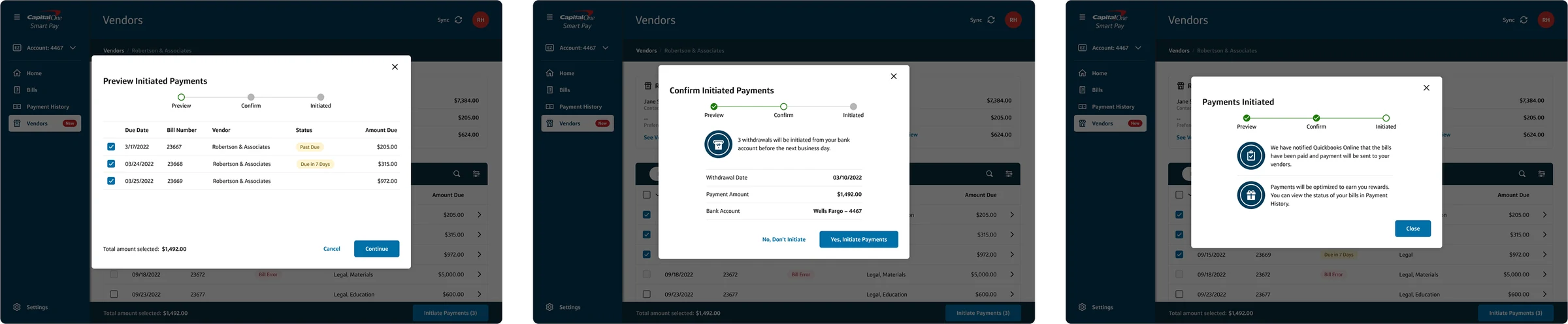
Vendor detail with three bills selected and Initiate Payments (3)Three-step payment from a vendor page: Preview, Confirm and Payments Initiated
Pay a vendor’s bills from their page.Select bills on the vendor page and pay them through the same three-step checkout used in Bills.

Impact

80% data validatedOver 80% of addresses were validated, and 22% of outdated
or duplicate addresses were removed
  • A standardized address validation experience across Bills, onboarding, and Vendors
  • Patterns that evolved from QuickBooks edits to direct editing in Smart Pay without a redesign
  • One reusable validation widget, reducing friction for users and effort for engineering

Reflections

This project deepened my experience building scalable UX systems under tight constraints. Working within QuickBooks syncing limits pushed me to think holistically about user journeys and long-term scalability. It reinforced the value of iterative design, cross-functional collaboration, and systems thinking in solving complex enterprise problems.

  • Building on existing patterns minimized friction and improved the experience.
  • Direct editing in the Vendors section improved workflows and user satisfaction.
  • A consistent experience across sections made the product easier to navigate.
  • Focusing on user needs and removing pain points significantly improved usability.