All work

Year-End Financial Review

A guided end-of-year experience that helps self-employed Lettuce customers review, confirm, and complete their financial data before tax season.

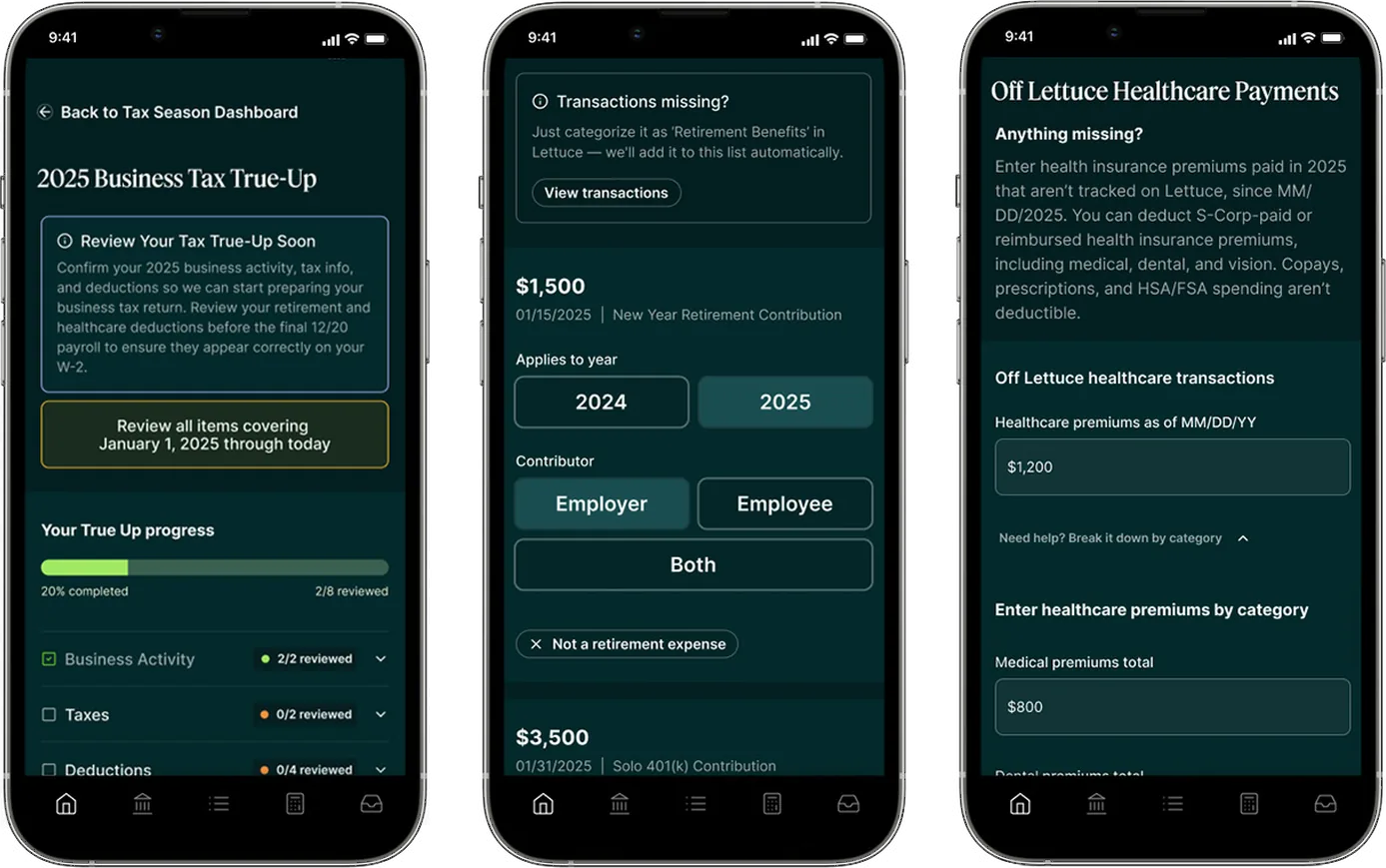
Lettuce tax true-up screens on three phones
Client
Lettuce Financial
Role
Lead Product Designer
Timeline
Under 1 month, kickoff to production
Scope
0→1 · Agentic AI · Edge cases · Fintech · B2C · SaaS · Native app

To comply with my non-disclosure agreement, I’ve omitted confidential information. The data featured here is my own and does not reflect Lettuce Financial’s views.

The problem

At a glance, a simple review flow. In reality, a time-based systems problem.

Lettuce supports freelancers and self-employed individuals in managing taxes, expenses, and deductions throughout the year. As tax season approaches, many face uncertainty about whether their financial data is complete, accurate, and ready for filing. Missing or outdated information leads to errors, delays, unnecessary stress, and missed deductions that cost them money.

The goal was an end-of-year experience that helps users review, confirm, and complete their data without overwhelming them with complexity or tax jargon. It had to support every user state, from fully synced data to entire sections missing, while accounting for deadlines, validation, and error handling.

Key challenges

  • A flow that works for complete, partial, and empty data
  • Multiple deadlines leading up to the end of tax season
  • Changing enrollment dates for healthcare and retirement
  • Overlapping contribution periods at the start of the year
  • Shipping quickly without sacrificing clarity or correctness
My role

I was the Lead Product Designer, partnering closely with a Product Manager and front-end and back-end engineering. I owned the end-to-end experience across desktop and mobile, from early structure through final delivery, working in parallel with engineering to meet a tight timeline.

  • Defined the feature structure and guided flow
  • Wireframed hierarchy, progression logic, and decision points
  • Designed for edge cases, empty states, and deadlines
  • Delivered high-fidelity design across desktop and mobile

Approach

Designing a guided system for incomplete, time-based data

01Framing the opportunity

The project moved from kickoff to production in under one month. Users arrived with very different levels of completeness, and tax deadlines, enrollment changes, and contribution windows varied from person to person.

  • Create a guided review with visible progress
  • Reduce uncertainty by surfacing completion states
  • Add deadline-aware notifications to communicate urgency and prioritize tasks
  • Establish reusable patterns within the product

02Defining the structure and flow

I designed a guided system that shows users what needs attention, what’s already complete, and what can be skipped. Three sections let users build confidence as they move through the flow, however much their data varies.

SectionSubsectionHandled as
Business activityOn-platform income and expensesInline
Off-platform income and expensesCustom form
TaxesPersonal detailsInline
Off-platform income tax paymentsCustom form
DeductionsRetirement contributionsMulti-page flow
Health insurance premiumsMulti-page flow
Business use of home and vehicleLink to existing experience

Every section follows the same mental model

  1. Overview
  2. Review
  3. Confirm or update
  4. Completion

03Wireframing and validating with engineering

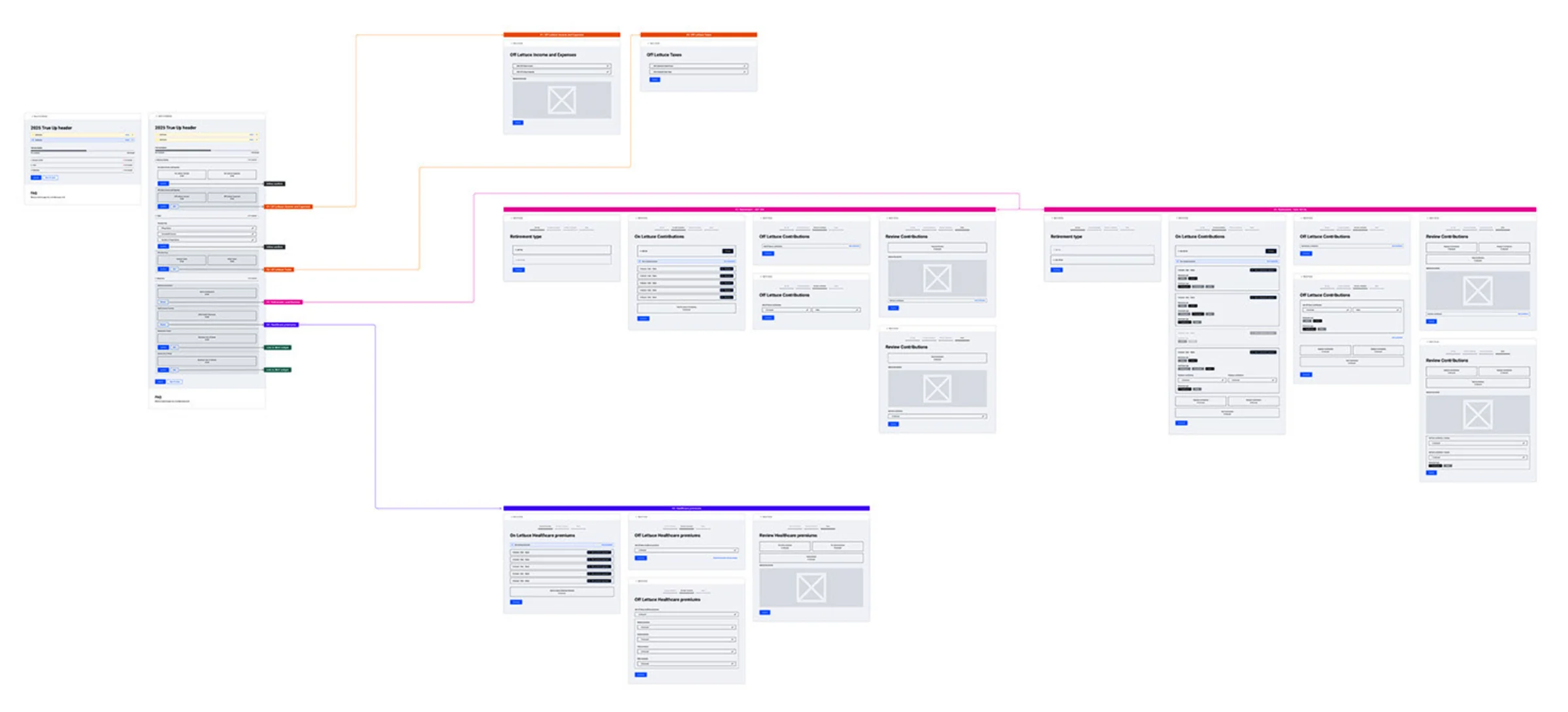
I started with wireframes to define information hierarchy, progression logic, and decision points before moving to high fidelity. This aligned engineering early on data dependencies and edge cases, so design and development could move in parallel.

  • Section hierarchy and how progress is communicated
  • How users enter and exit each section
  • How completion and blockers are communicated
  • Where missing data could block users
  • Error handling and empty states
  • Deadline-driven messaging and reminders
User flow from the True Up landing page into each section: off-platform income and taxes, retirement contributions, and healthcare premiums
Wireframed user flow from the landing page into each section.Mapping every path early let design and engineering align on data dependencies and work in parallel.

04Designing for edge cases and empty states

No two users shared the same financial or timeline context. Beyond missing data, the experience had to handle time-based edge cases across the whole year, and sometimes into the next.

  • Multiple deadlines. Deadline-aware messaging at the section and subsection level shows what’s due, by when, and what can wait.
  • Variable enrollment dates. Multiple enrollment periods and mid-year changes are supported, without assuming a single timeline.
  • Contributions across calendar years. Early-year retirement contributions for the previous tax year are clearly separated, preventing misclassification.
  • Empty and partial states. Users are guided to next steps without being blocked.
  • Validation. Inputs are checked in context, preventing incorrect submissions while keeping the flow moving.

Outcome

A guided path to tax readiness

Three sections, one repeatable pattern, and deadline-aware guidance gave users a clear view of what was done and what still needed attention.

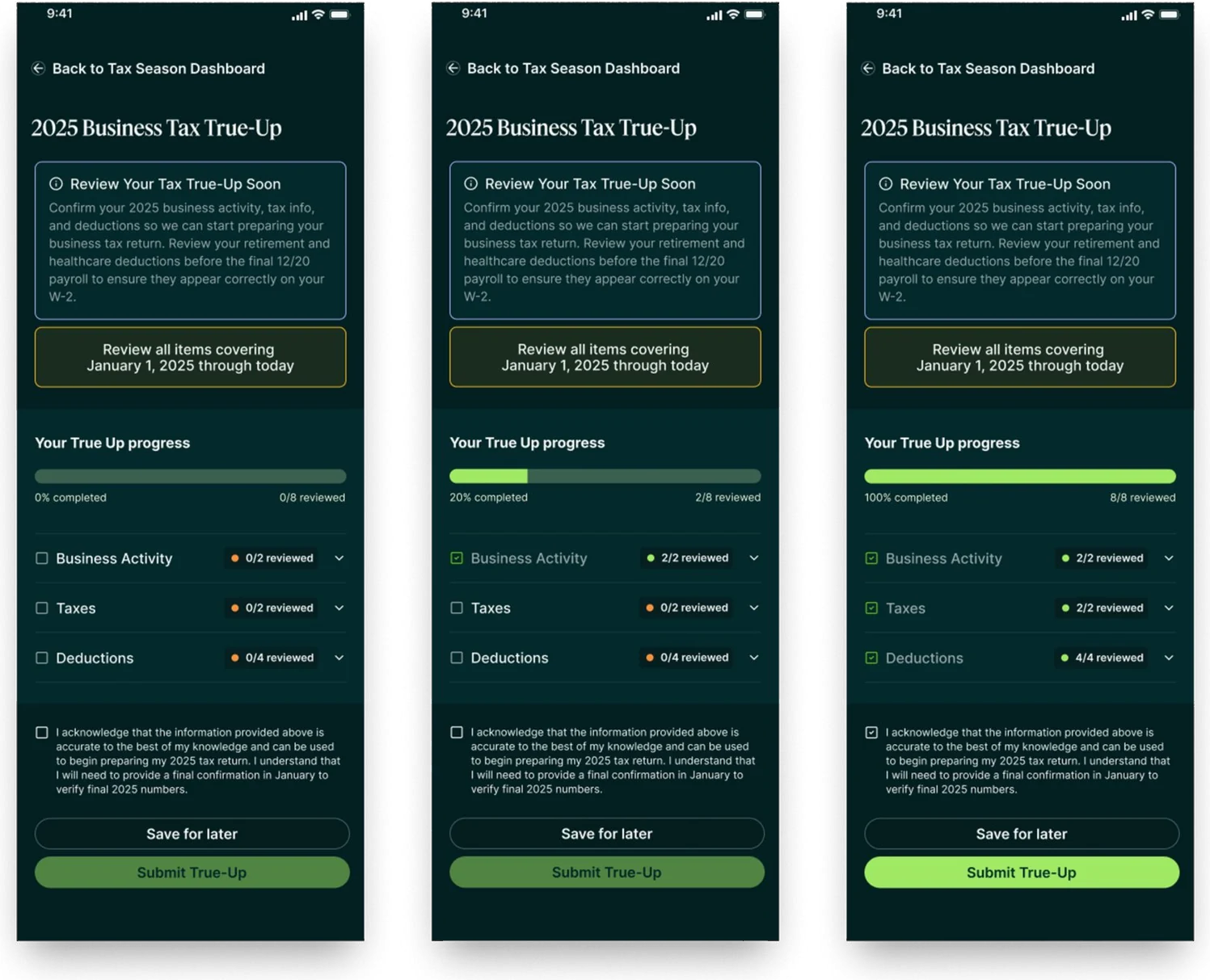
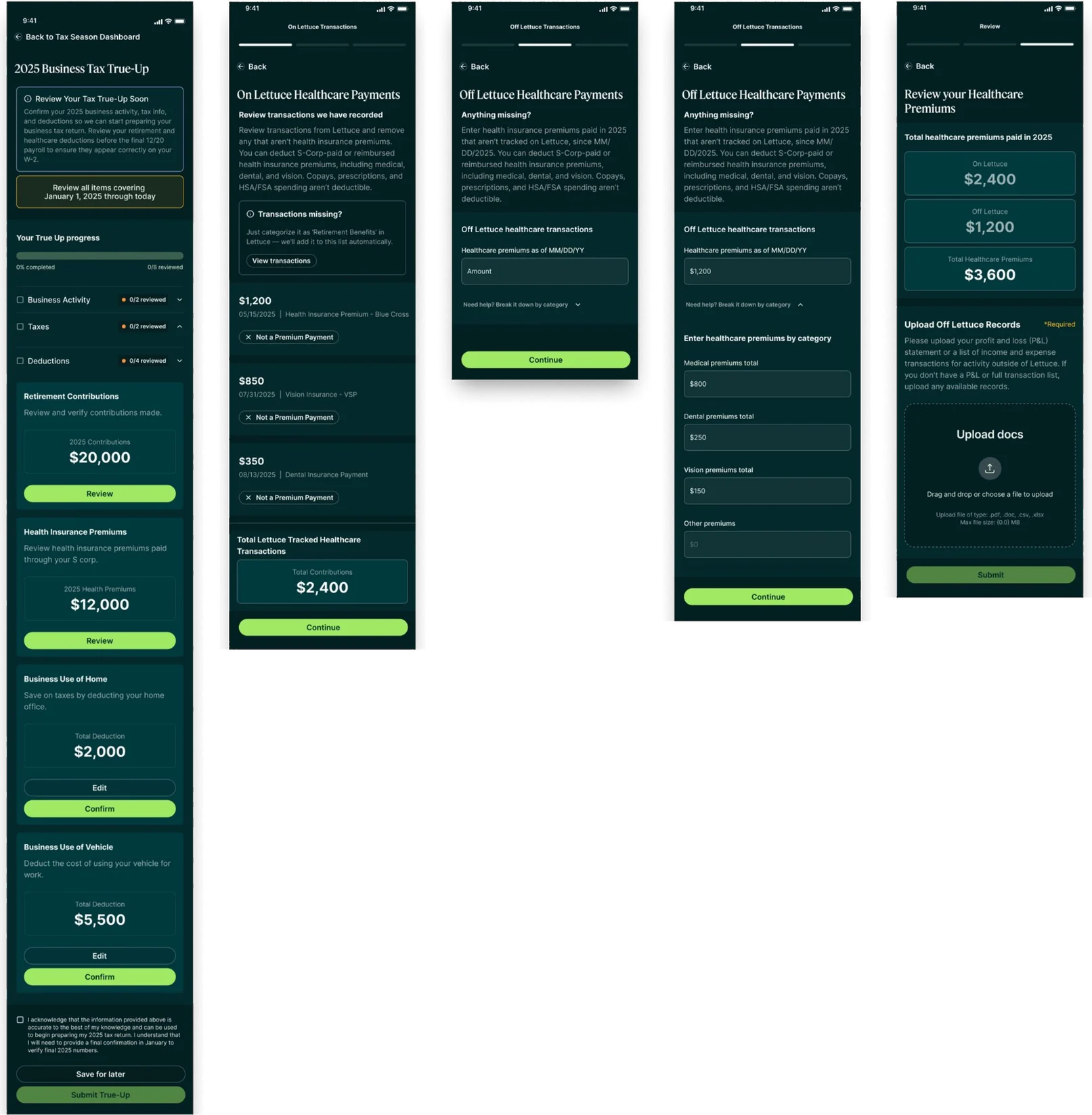
True-Up landing page at 0%, 20% and 100% progress
An immediate snapshot of tax readiness.Progress across Business Activity, Taxes, and Deductions shows what needs attention and what’s already complete.
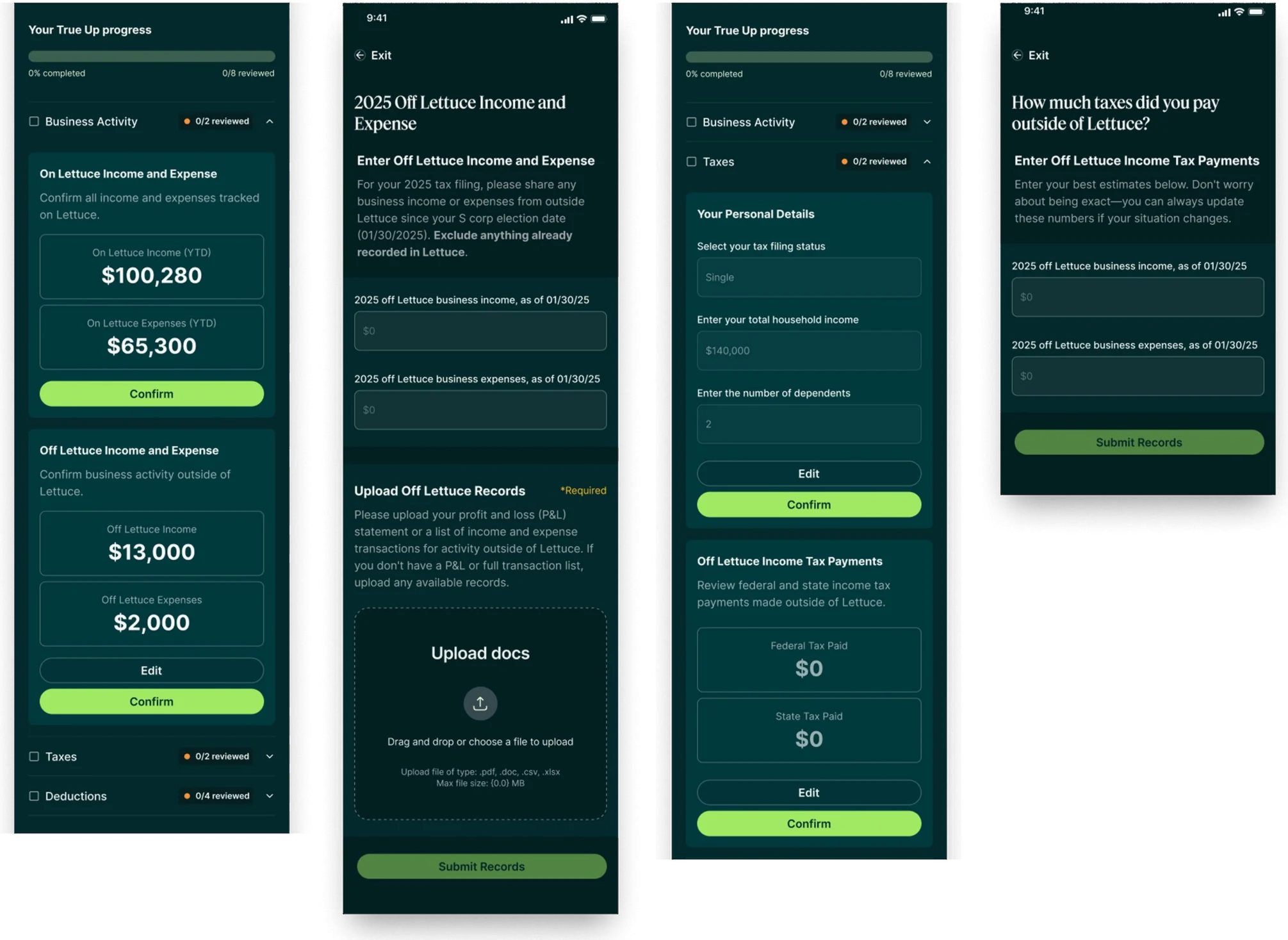
Business activity and taxes screens: on- and off-platform income, personal details and tax payments
Business activity and taxes, reviewed in one place.On- and off-platform activity sits side by side, and users see what’s on file, what’s missing, and what’s required before filing.
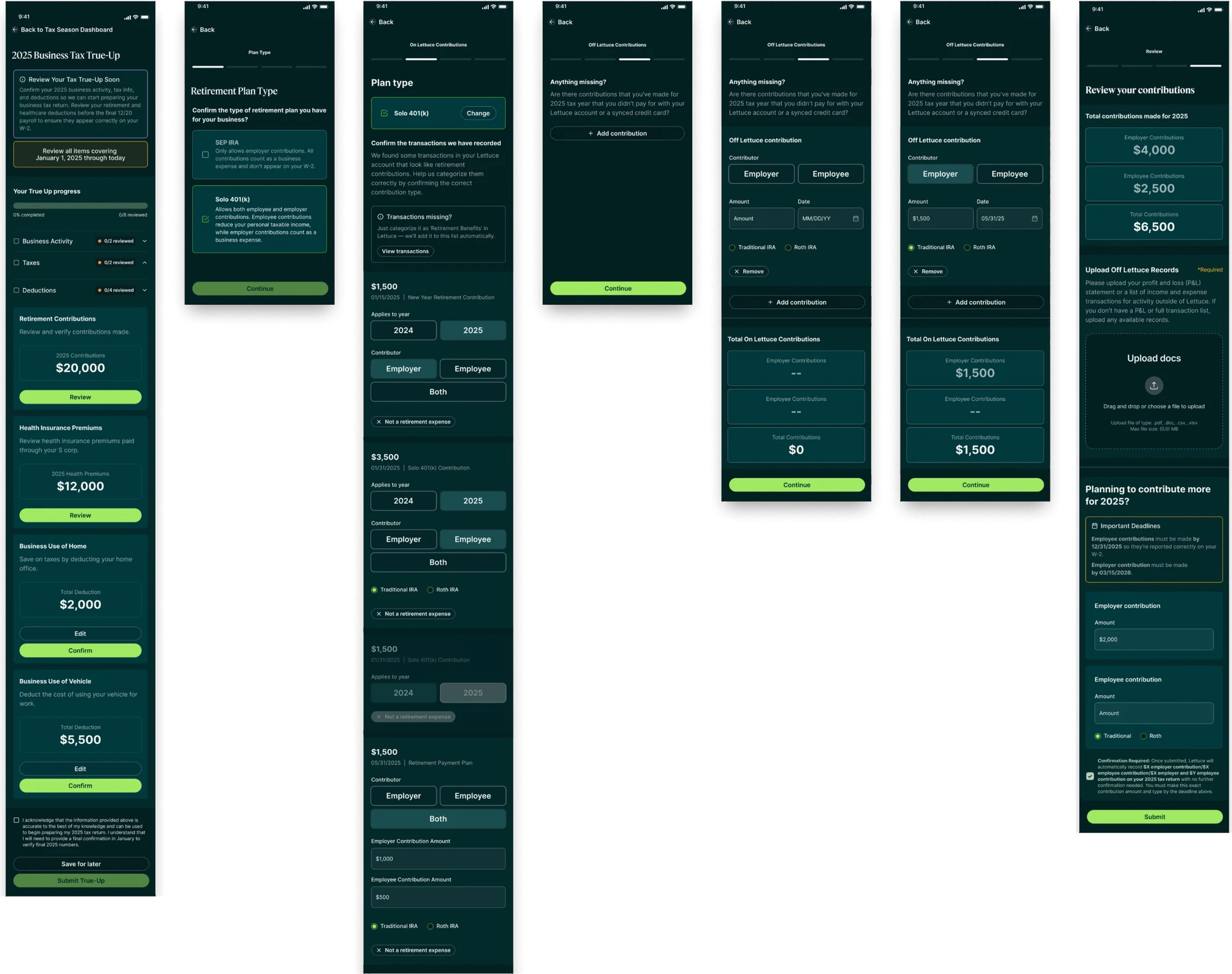
Retirement contributions flow: plan type, on- and off-platform contributions, and review
Contribution periods kept clearly apart.Visual separation and clear totals help users confirm eligibility and avoid misclassifying early-year contributions.
Health insurance premiums flow: on- and off-platform payments, category breakdown and review
Built for changing coverage.Multiple enrollment windows and gaps are supported, with structured layouts and contextual prompts.

Impact

1 monthLaunched in under a month, from kickoff to production across desktop and mobile
3 sectionsOne repeatable pattern, from overview to completion
  • One guided flow for complete, partial, and empty data
  • Deadline-aware messaging at the section and subsection level
  • Support for mid-year enrollment changes and cross-year contributions
  • Reusable patterns that became a foundation for future guided workflows in Lettuce

Reflections

This project reinforced the importance of designing systems that account for time, uncertainty, and incomplete data, especially in financial products where trust is critical. Shipping a complex feature in under a month required decisive prioritization, close cross-functional collaboration, and a strong underlying structure.

The patterns established here created a scalable foundation for future guided workflows in Lettuce and strengthened my approach to designing high-stakes, deadline-driven experiences.