All work

Flight Checkout Flow

A checkout for a corporate travel app that brings budgets, virtual cards, and company policy into an existing booking flow.

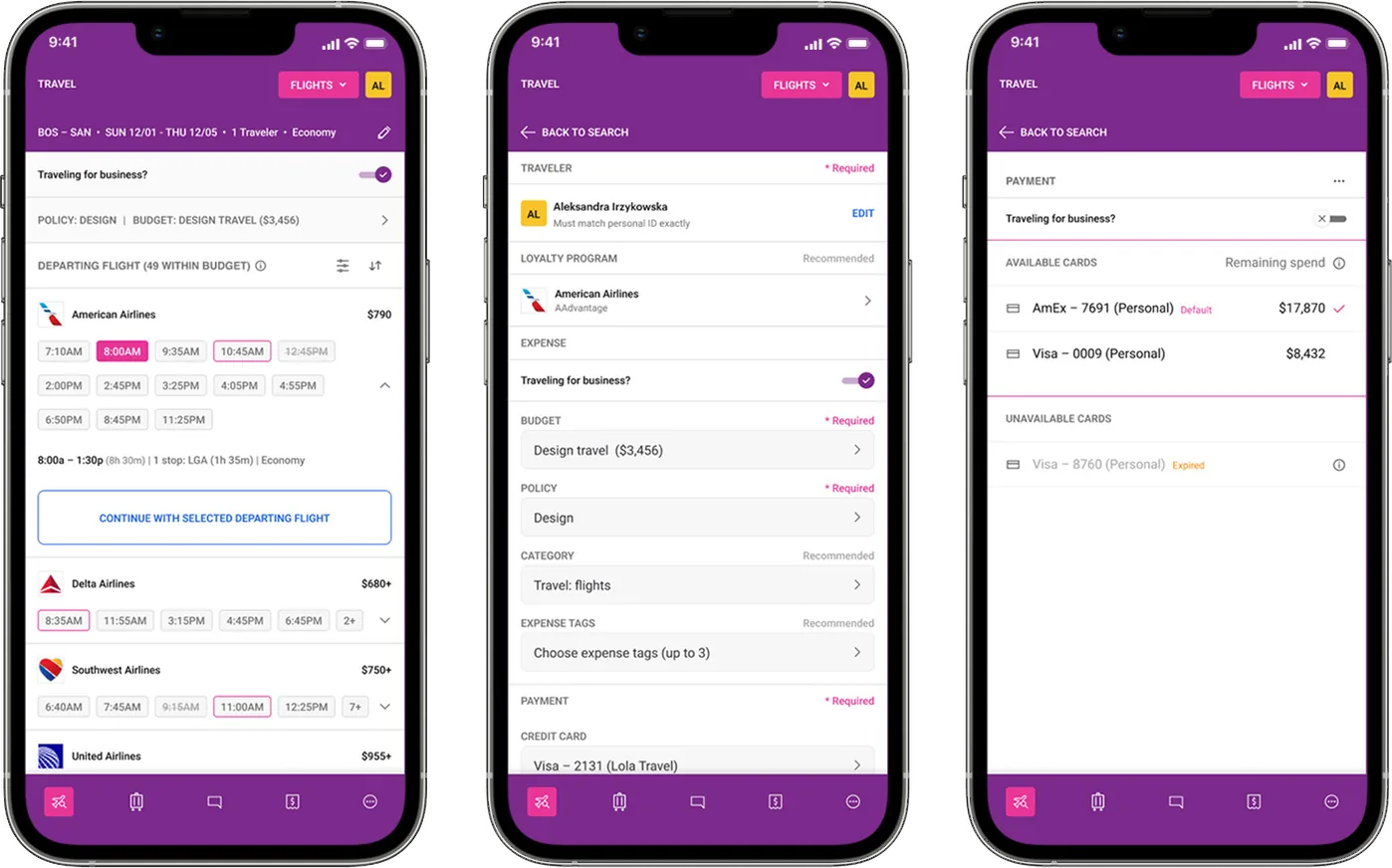
Lola flight checkout screens on three phones
Client
Lola Travel & Expenses
Role
Product Designer
Platform
iOS and Android
Scope
Edge cases · Fintech · Travel · B2C · Native mobile

To comply with my non-disclosure agreement, I’ve omitted confidential information. The data featured here is my own and does not reflect Lola’s views.

The problem

A booking checkout that suddenly had to handle company money.

Lola started as a business travel app. Employees booked flights, hotels, and cars for business and personal trips. Spend management came later as a core expansion: virtual cards, budgets, and policy enforcement at the point of purchase, set by finance teams and admins.

The existing checkout worked for basic bookings. Now it had to present the right budgets for a trip, surface the cards tied to them, enforce travel policy, and handle expired cards, insufficient limits, and budgets with no eligible payment method, all without blocking the traveler. Too much friction and frequent travelers would work around the system. Too little clarity and finance teams would inherit out-of-policy bookings.

Key challenges

  • Surface the right virtual card for the right budget, without listing every card on file.
  • Make the ‘Traveling for business?’ toggle meaningful: the full expense layer for business trips, a clean flow for personal ones.
  • Handle expired cards, insufficient limits, and budget mismatches with a clear reason and a way forward.
  • Keep checkout fast for frequent travelers who just need to confirm.
  • Enforce policy without taking away autonomy: guide without blocking, explain without lecturing.
My role

I was the sole designer on this project and owned it end to end. I worked directly with the product manager and engineering to validate feasibility across every edge case. The checkout pattern I set up later became the template for hotel and car rental bookings.

  • Mapped the full decision tree of budget and payment scenarios
  • Defined the information architecture and interaction patterns
  • Pressure-tested the logic in review rounds with product and engineering
  • Shipped final specs for every card and budget state

Approach

Every state mapped first, then the screens

01Mapping every checkout state

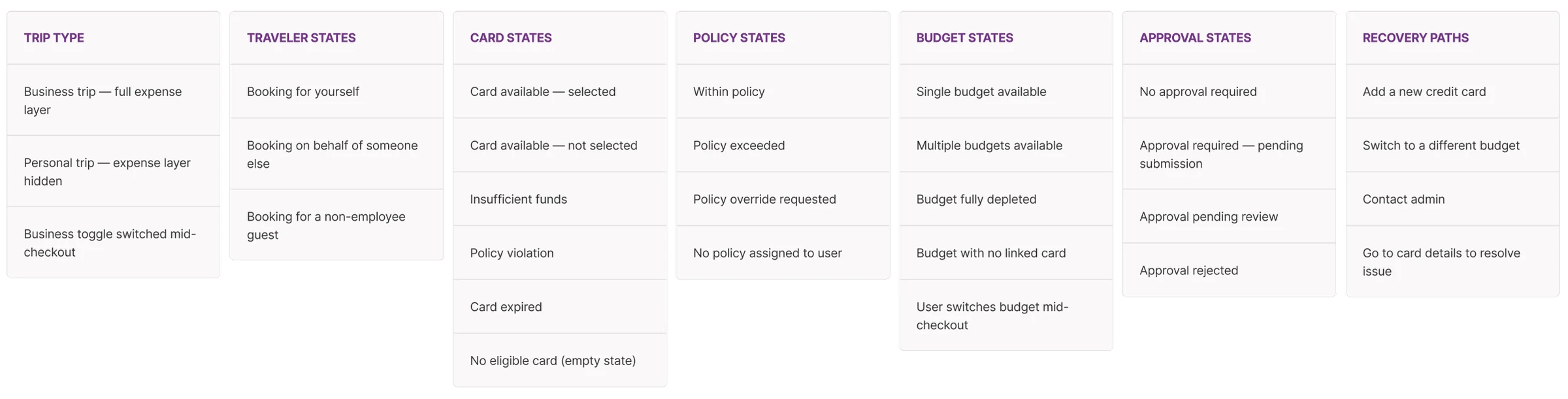
Before designing anything, I mapped every state the checkout could be in: business or personal trip, one budget or many, card available or not, policy met or exceeded. The exercise showed how many edge cases existed, and made it clear the real complexity lived in the payment section, not in flight selection or traveler details.

Checkout state map: trip type, traveler, card, policy, budget and approval states, plus recovery paths
Seven dimensions, mapped before a single screen.Trip type, traveler, card, policy, budget, and approval states, plus the recovery paths that get a traveler unstuck.

02Showing only the cards that can pay

The insight that shaped the design: travelers don’t need to see all their cards. They need to see which cards are valid for this booking, and why. That reframe became the available and unavailable card split at the core of the payment UI.

Design decisions

  • The business toggle as the gateway. Switching it on reveals budget, policy, category, and expense tags. Personal trips stay minimal.
  • Budget drives card availability. Selecting a budget instantly updates which cards are eligible to pay.
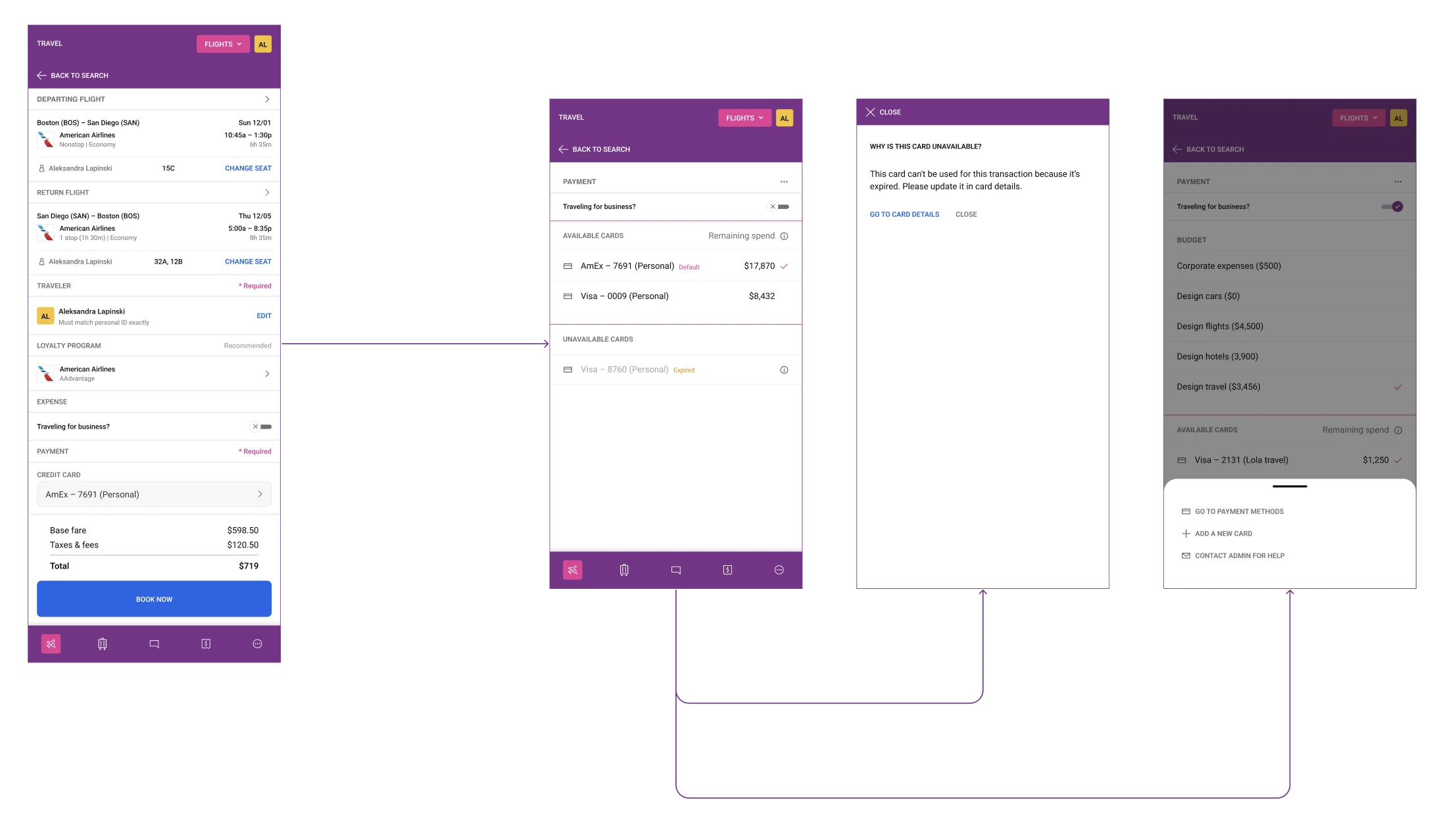
  • Available and unavailable cards in one view. Clearly separated, so travelers see why a card can’t be used without leaving checkout.
  • A reason and an action on every unavailable card. An inline reason, plus ‘Go to card details’ or ‘Contact admin’.
  • Remaining spend next to each card. No mental budget math at the payment step.
  • An empty state with options. When no card is eligible: add a card, use a different budget, or contact admin.

Outcome

One scrollable checkout for booking and spend

Flight and traveler details sit at the top, the expense section behind the business toggle in the middle, and a payment section that responds to the selected budget at the bottom. For frequent travelers, sensible defaults and pre-selected budgets and cards keep straightforward business bookings to a minimum of steps.

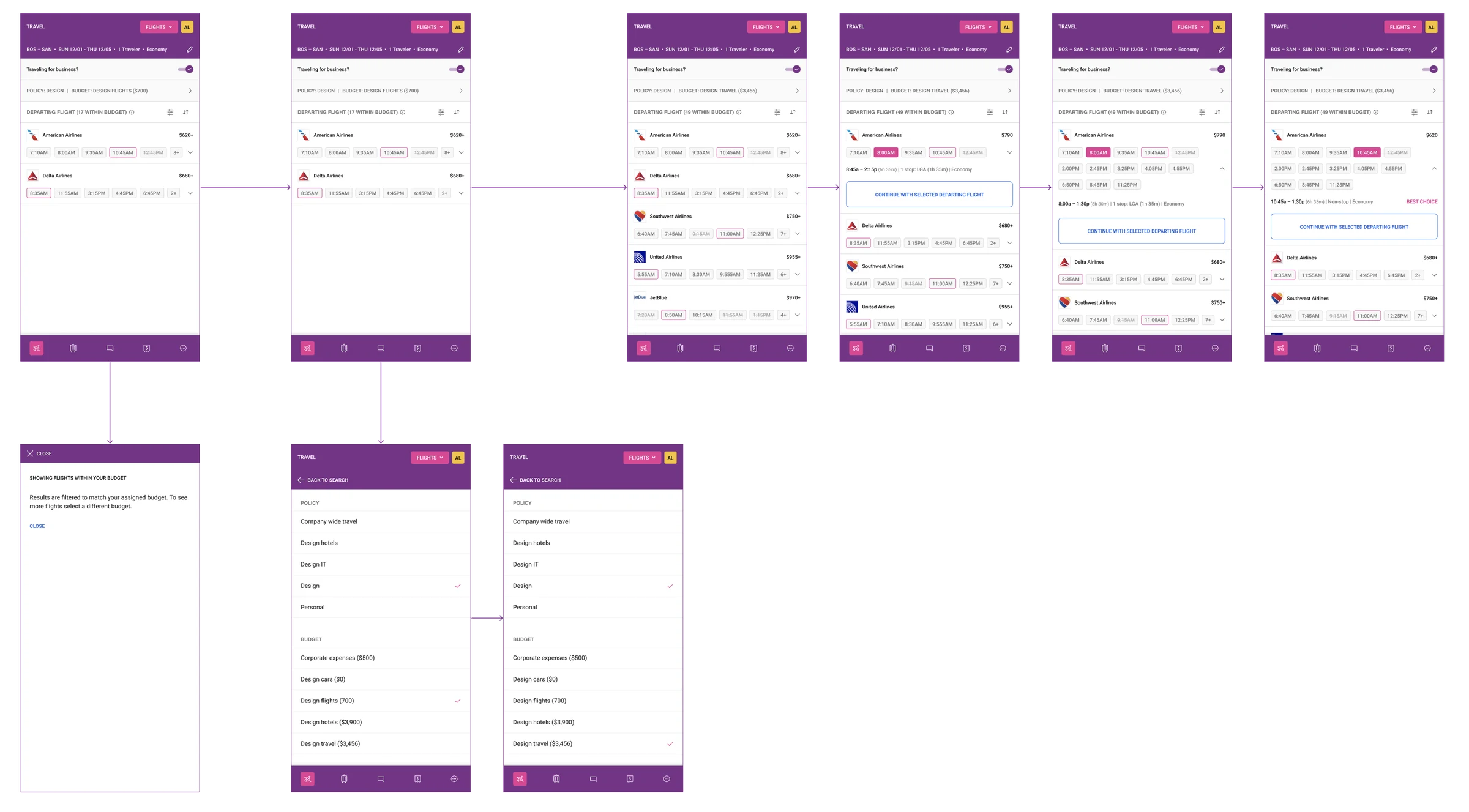
Flight search results filtered by budget, a budget tooltip, policy and budget selection, and the continue with selected departing flight action
Search results filtered to the traveler’s budget.Policy and budget stay visible in the header, and a tooltip explains the filter. Switching from Design Flights to Design Travel updates the results and price ceiling.
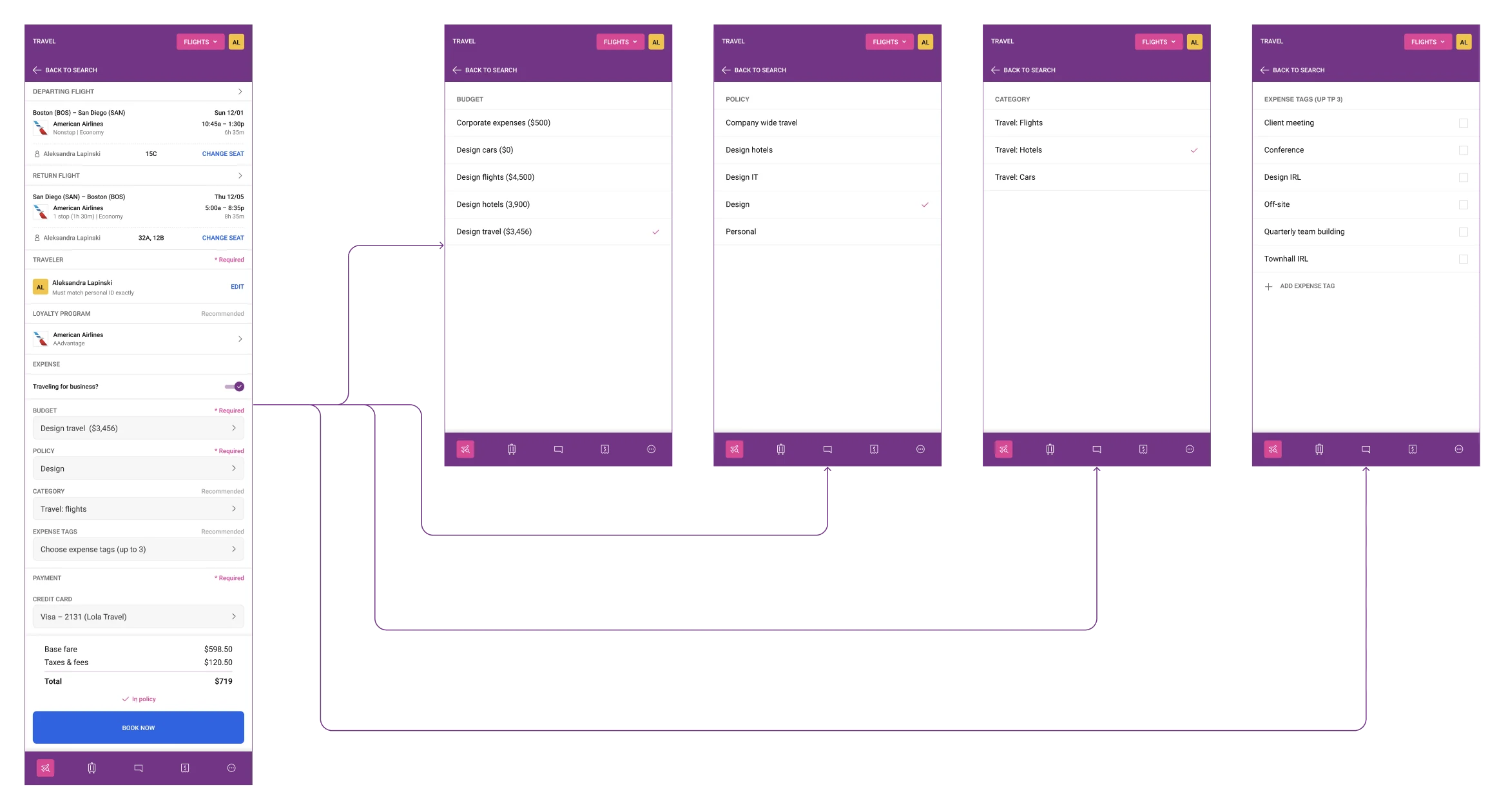
Checkout form with budget, policy, category and expense tag fields, each opening a full-screen selection view
The full expense layer in one checkout.Each field is marked required or recommended and opens a full-screen selection. Category has no default, so the traveler makes an explicit choice, and expense tags allow up to three.
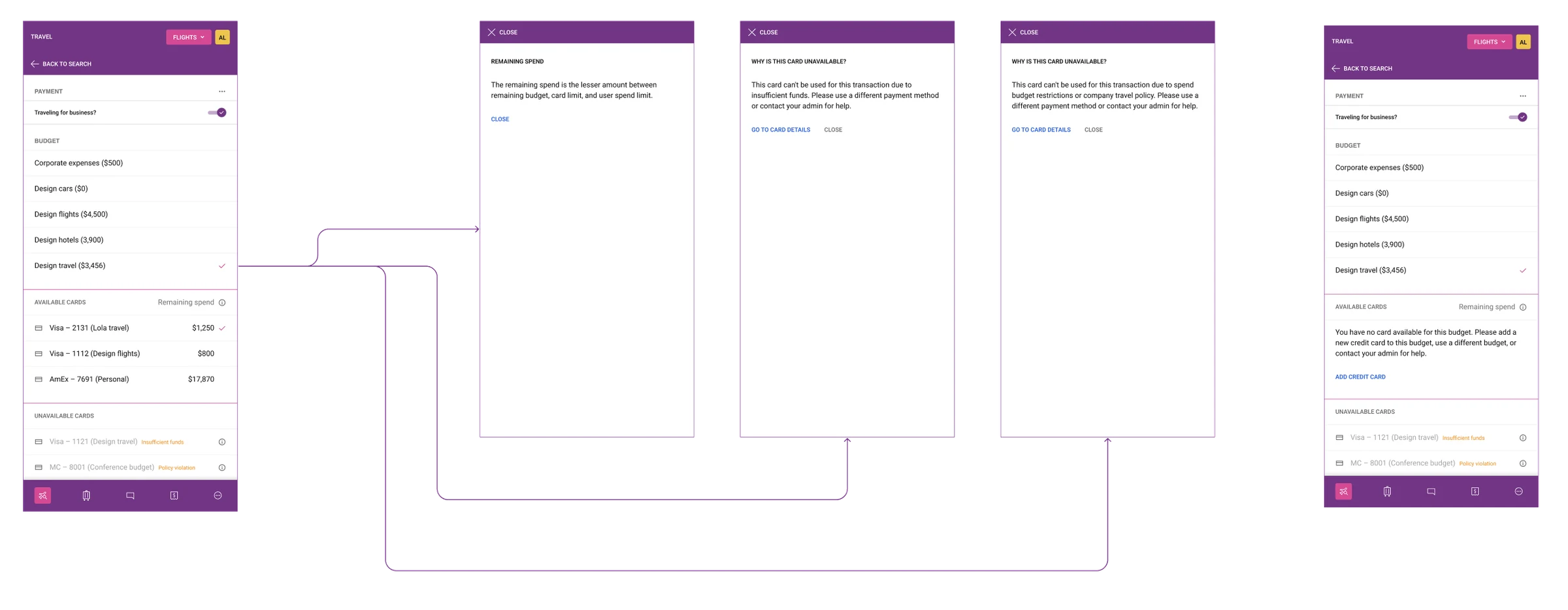
Payment section with available cards and remaining spend, unavailable cards with reasons, explanation overlays, and the no eligible card state
Cards grouped by whether they can pay.Available cards show remaining spend. Unavailable cards carry a reason, ‘Insufficient funds’ or ‘Policy violation’, with an explanation one tap away. When no card is eligible, a plain-language message and ‘Add credit card’ replace the error.
Personal trip checkout with personal cards, an expired card overlay, and a bottom sheet with more payment options
Personal trips collapse to what matters.With the toggle off, only personal cards appear. An expired card explains itself and links to card details, and a bottom sheet offers payment methods, a new card, or admin help.

Impact

1 pattern, 3 checkoutsThe card and budget pattern became the template for hotel and
car rental bookings in the following product cycles
  • Spend management added to the existing checkout without a full rebuild
  • Every card and budget state comes with a reason and a next step, which reduced reliance on admin support for payment issues
  • Existing users saw it as a natural evolution, not a new product

Reflections

The most valuable thing I did on this project was map every checkout state before designing anything. It felt slow at the time, but by the time I opened the screens I understood the logic completely. There were no surprises in engineering review, because the edge cases had already been worked through. Map first, design second is now standard in how I approach complex flows.

If I revisited this project, I’d invest more in testing with finance admins, not just travelers. The policy and budget logic was sound, but admins likely had different mental models of how cards and budgets relate. That perspective would have strengthened the edge case handling.