All work

Payment Platform

A 0→1, QuickBooks-integrated B2B payments platform that moved mid-sized businesses from paper checks to card payments.

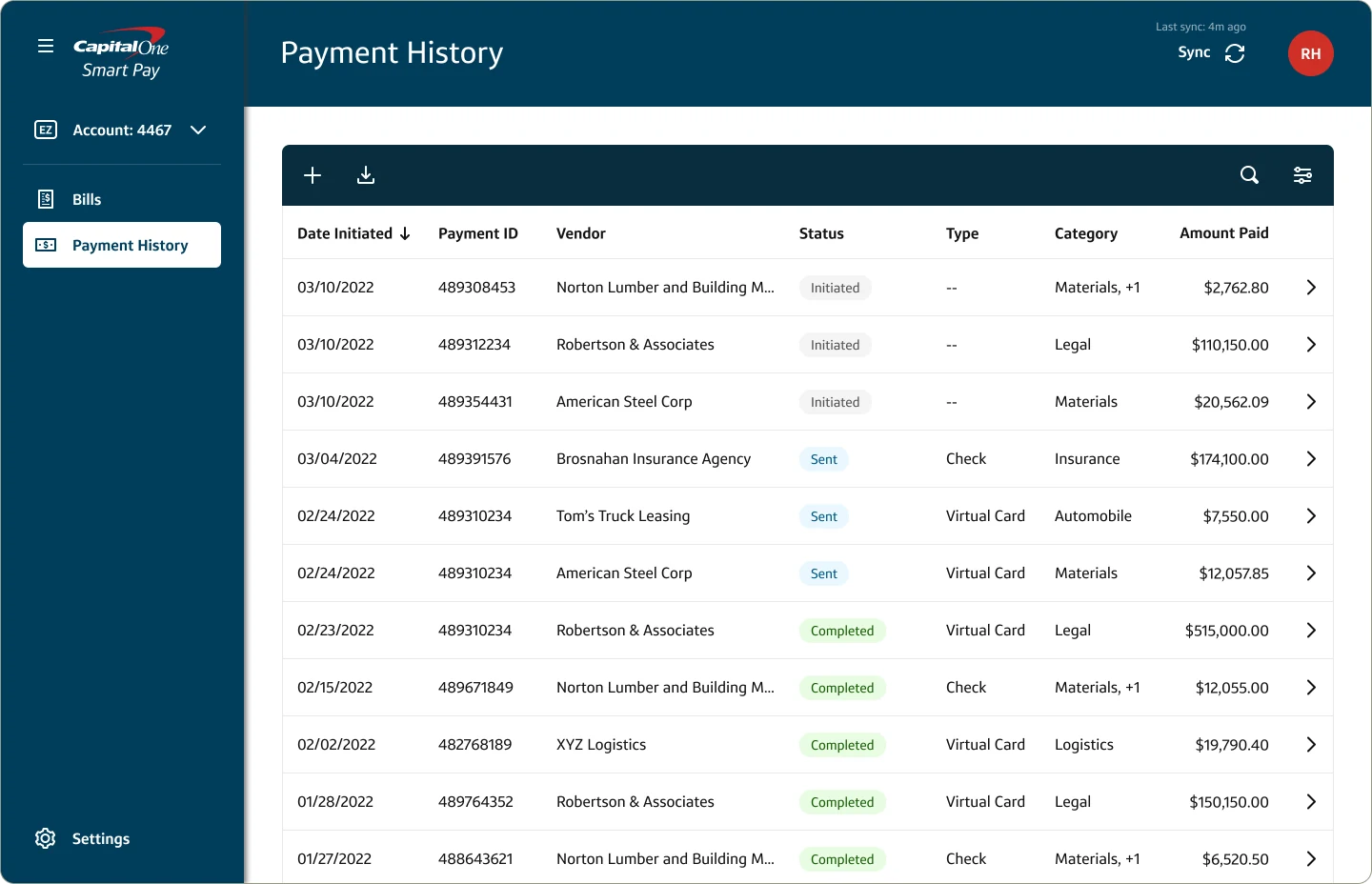
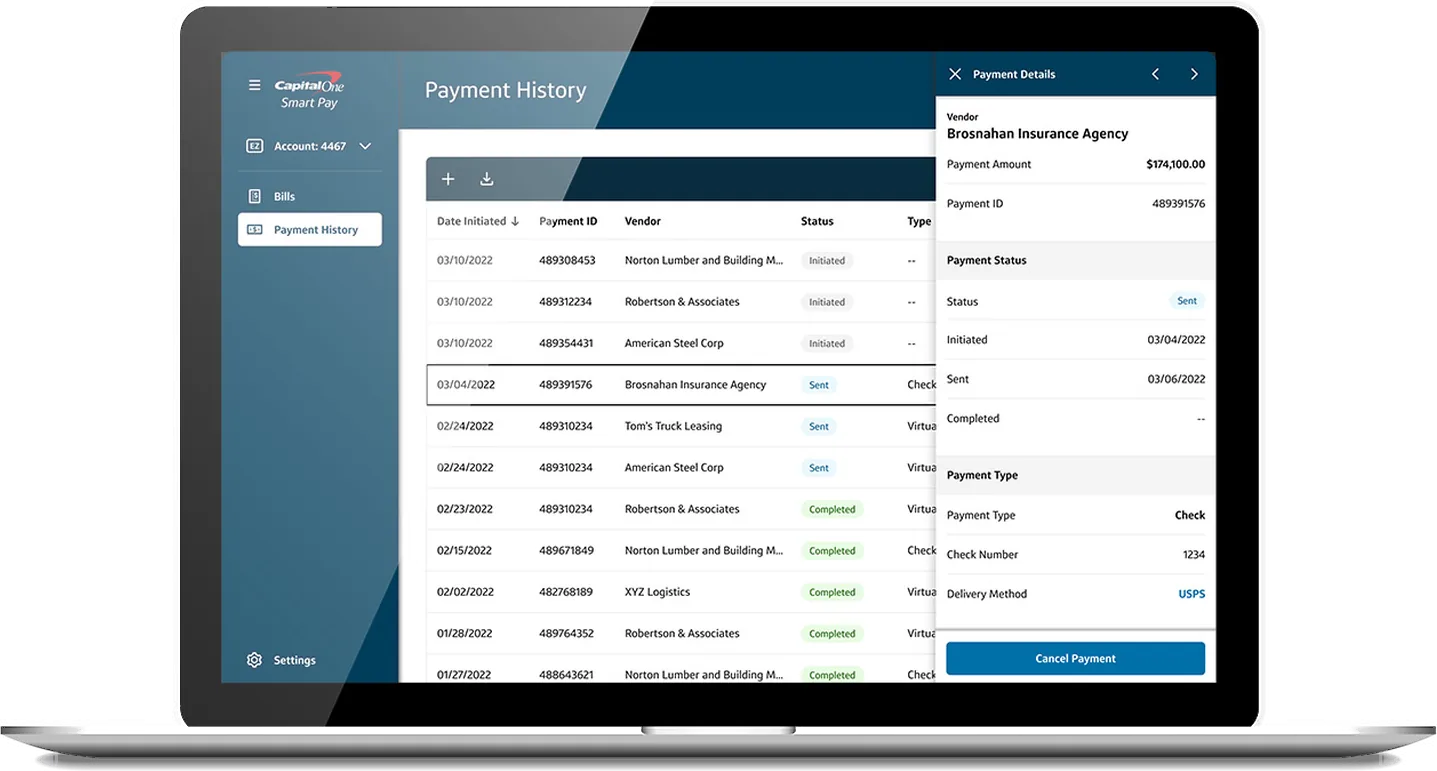
Capital One Smart Pay payment history on a laptop
Client
Capital One
Role
Senior Product Designer
Launch
MVP shipped August 2022
Scope
0→1 · Design system · Edge cases · Compliance · Fintech · B2B payments

To comply with my non-disclosure agreement, I’ve omitted confidential information. The data featured here is my own and does not reflect Capital One’s views.

The problem

Mid-sized businesses were losing control of accounts payable.

In 2020, Capital One began in-depth research into gaps in financial services, which led to a B2B payments platform. Acquiring the Lola Travel & Expenses team in 2021 accelerated that vision. I moved over with them, and together we launched Smart Pay: bill pay for mid-sized businesses, integrated with QuickBooks Online. The goal was to move payments from paper checks to cards, so businesses could earn more rewards, pay vendors faster, and keep cash on hand longer.

The challenge was to launch an MVP within nine months that addressed the core pain points and set a foundation for future iterations.

Key challenges

  • Slow, manual check payments
  • Little visibility into individual transactions
  • Reconciling payments with invoices
  • Security risks around payment fraud
  • Connecting QuickBooks with accounting, banking, and ERP systems

The opportunity

  • Clear, intuitive payment flows that reduce ambiguity and errors
  • Consistent interaction patterns across the platform
  • Trust through transparent payment status and feedback
  • Reusable components that scale as Smart Pay evolves

My role

As senior product designer, I owned the design process from user flows and wireframes to low- and high-fidelity prototypes. The team blended about 60 people from Lola, including three designers, with around 80 Capital One employees. We delivered the MVP prototype in 6–7 months, ahead of the target deadline.

  • Led design from flows through high-fidelity prototypes
  • Managed and mentored a junior designer
  • Partnered with content, research, and design system teams
  • Worked with QA and front-end engineering through launch

Approach

Research first, then an MVP scoped to two flows

01Understanding how finance teams pay

To build the right solution, we first needed to understand how mid-sized businesses manage payments today, and why it so often breaks down. Our UX research team ran more than a dozen in-depth interviews with finance managers, controllers, and AP teams across industries, validating the assumptions that would guide the design.

Pain points

  • Managing payments across many payment types
  • No visibility into individual transactions, especially with suppliers
  • Accounting, banking, and ERP or Excel tools that don’t connect
  • Reconciling payments with invoices
  • Adopting new financial technology

Core needs

  • Timely payments
  • Fraud prevention
  • Efficient supplier payments
  • Simple reconciliation of payable invoices
  • Proactive monitoring to prevent errors and delays
  • Lower costs through automated AP
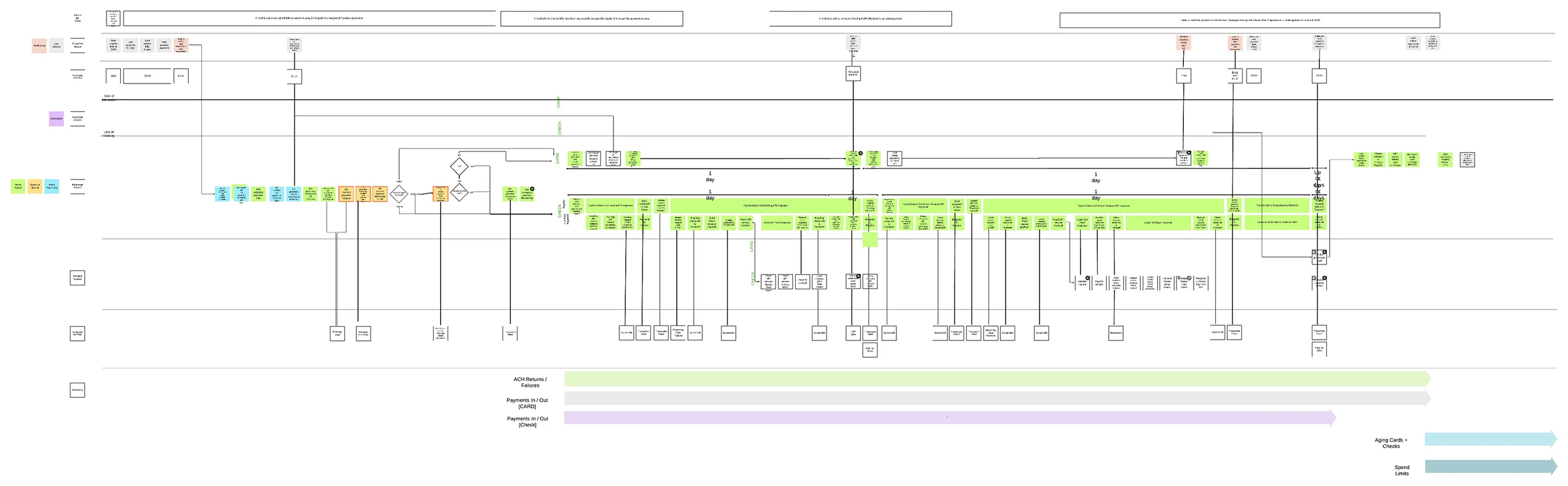
Customer journey map of the payment process across customer, Smart Pay and back-end systems
A journey map of every touchpoint in the payment process.It highlighted where the process breaks down and guided how we streamlined each interaction.

02Scoping the MVP to Bill Pay and Payment History

With a firm launch deadline, we focused on two core features and on raising the quality of the existing UI with essential components from Capital One’s OMNI design system.

  • Onboarding. A simple integration for QuickBooks and bank accounts.
  • Bill Pay. One flow for paying a single bill or many.
  • Payment History. Clear statuses, with the option to review or cancel.
  • Tiered alerts. Critical issues and statuses always visible, without getting in the way.
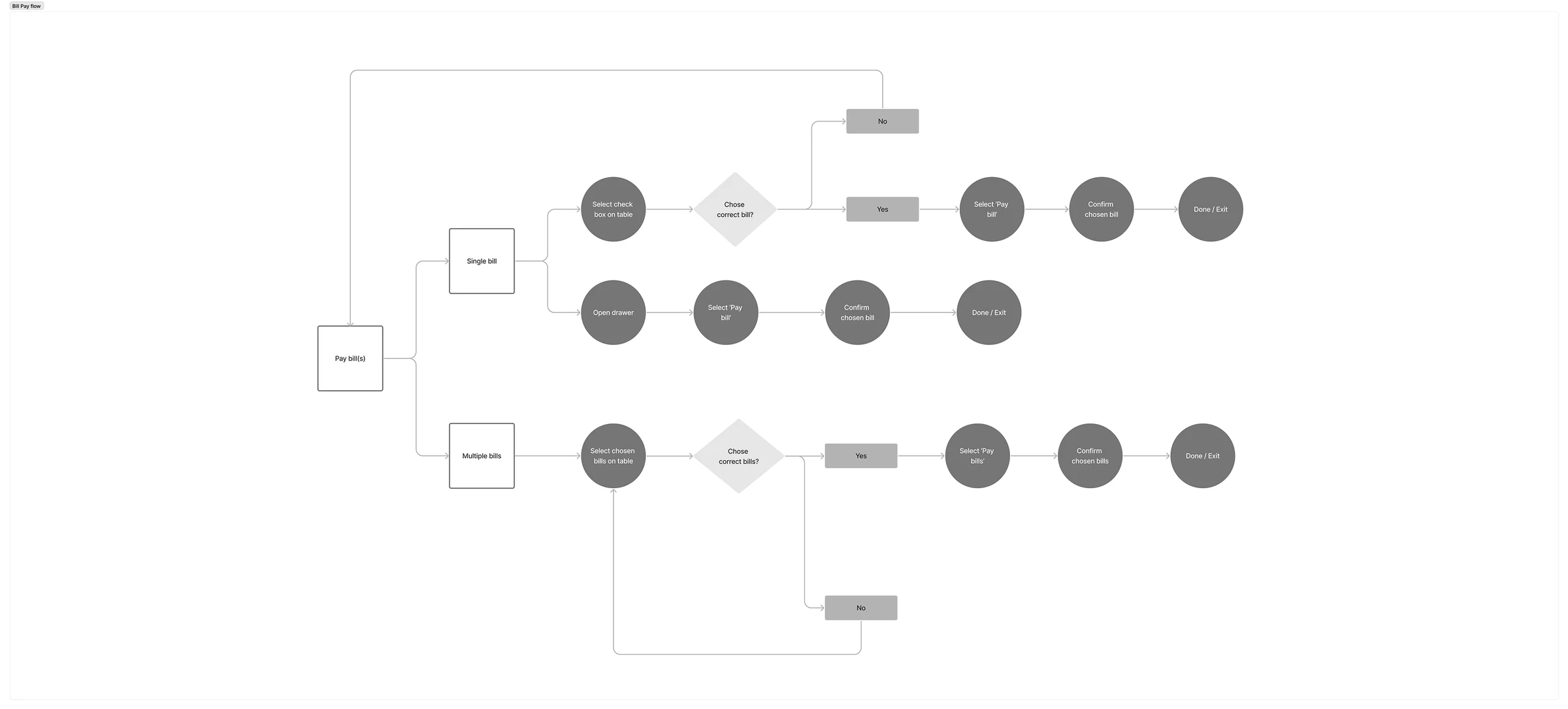
Bill pay flow chart: single bill from the table or drawer, multiple bills from the table
One flow for one bill or many.A single bill can be paid from the table or the detail drawer, multiple bills from the table. The alignment kept the flow simple and engineering implementation smooth.

03Wireframing the whole product, shipping the core

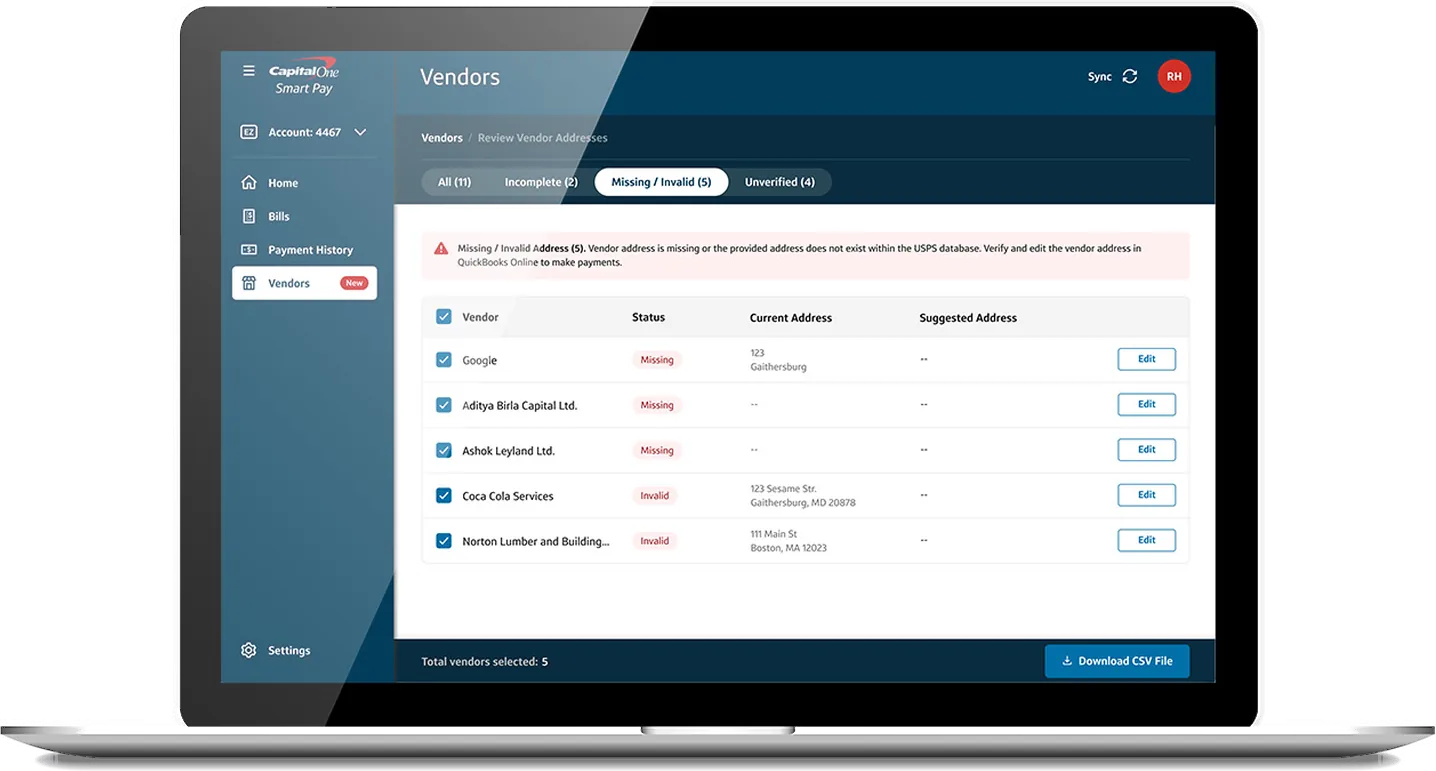
The MVP launched with Bills and Payment History, and only the essentials in Settings. We also wireframed Home, Vendors, and expanded Settings, so the experience stayed cohesive as the product grew.

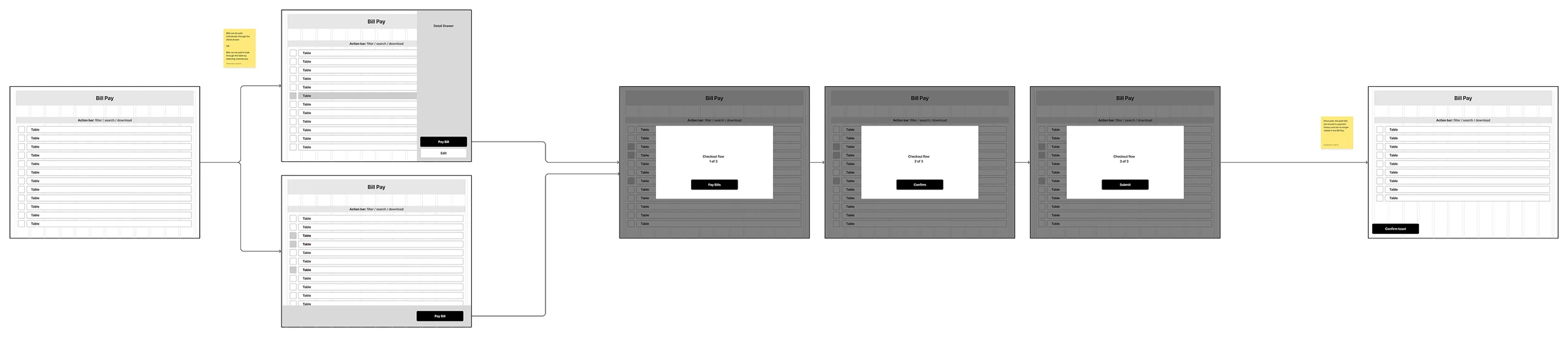
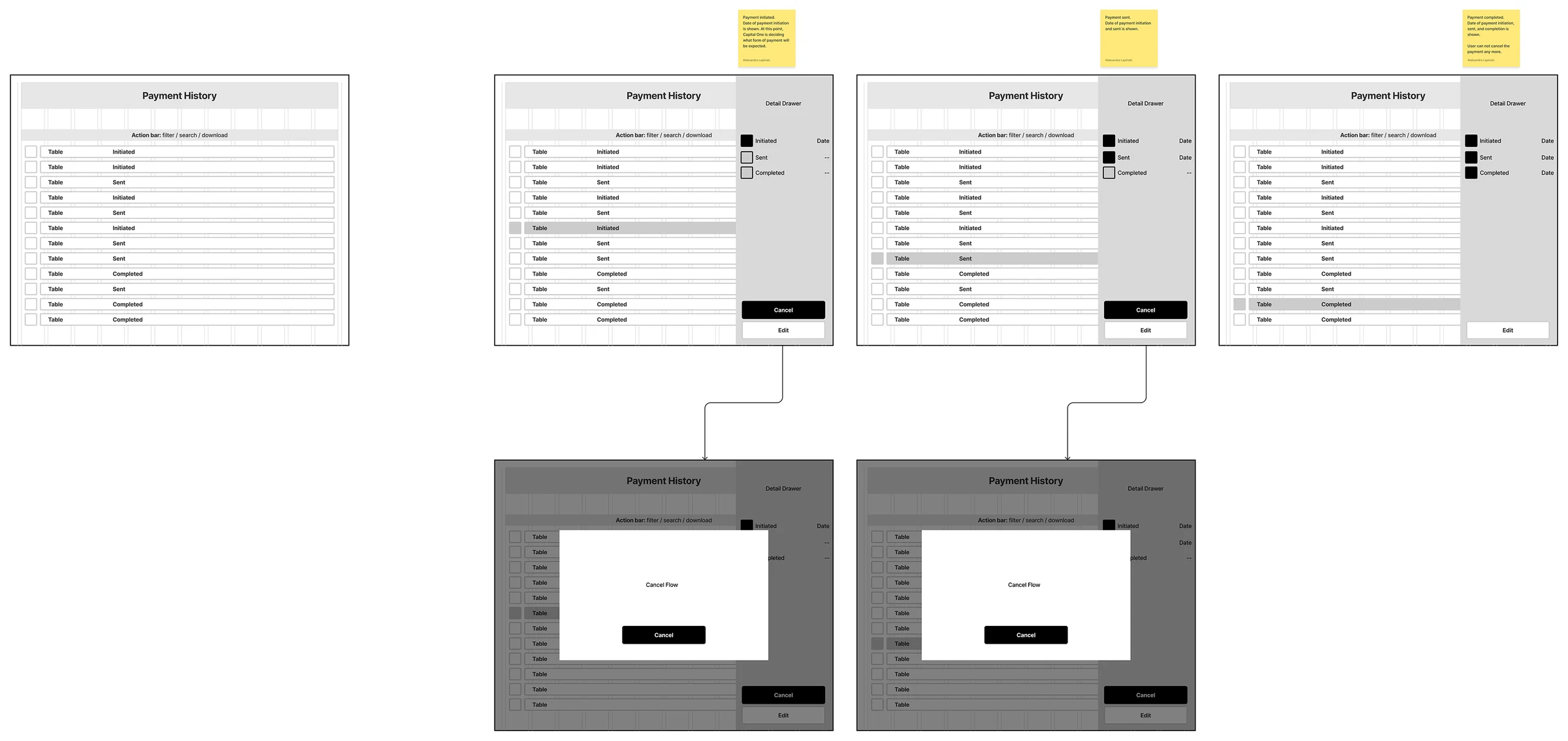
Bill pay wireframe: single bill from the drawer or multiple from the table, through a three-step checkoutPayment history wireframe: initiated, sent and completed states in the detail drawer, with the cancel flow
Bill Pay and Payment History, wireframed end to end.From selecting bills through a three-step checkout, and from initiated to completed payments, including when a payment can still be cancelled.

04From an interim design system to a company-wide overhaul

Capital One ran on multiple design systems, including the outdated OMNI. Each product had established its own patterns, so the experience was inconsistent from one product to the next, and engineering often built the same components multiple times.

For Smart Pay, I worked with the design systems team to build an interim design system that improved UI quality and usability while reducing engineering complexity. It enabled a smoother MVP launch and laid the foundation for Capital One’s new UI.

That work led to me leading the overhaul of Capital One’s design system, consolidating the separate systems into one streamlined version that scaled across all products. Designers and engineers worked from one shared set of patterns instead of rebuilding the same ones for each product.

05Testing every week, through launch

Weekly usability tests refined the interface, the language, and the payment process, so the MVP met both user and business needs before release. Ahead of launch, I worked with QA and front-end engineering to fix design bugs and resolve remaining edge cases.

Outcome

Bill pay made simple, from QuickBooks to payment

The Smart Pay MVP launched in August 2022, on deadline. The prototype became a guide for future Capital One products, showing how intuitive design can simplify complex financial tasks for businesses.

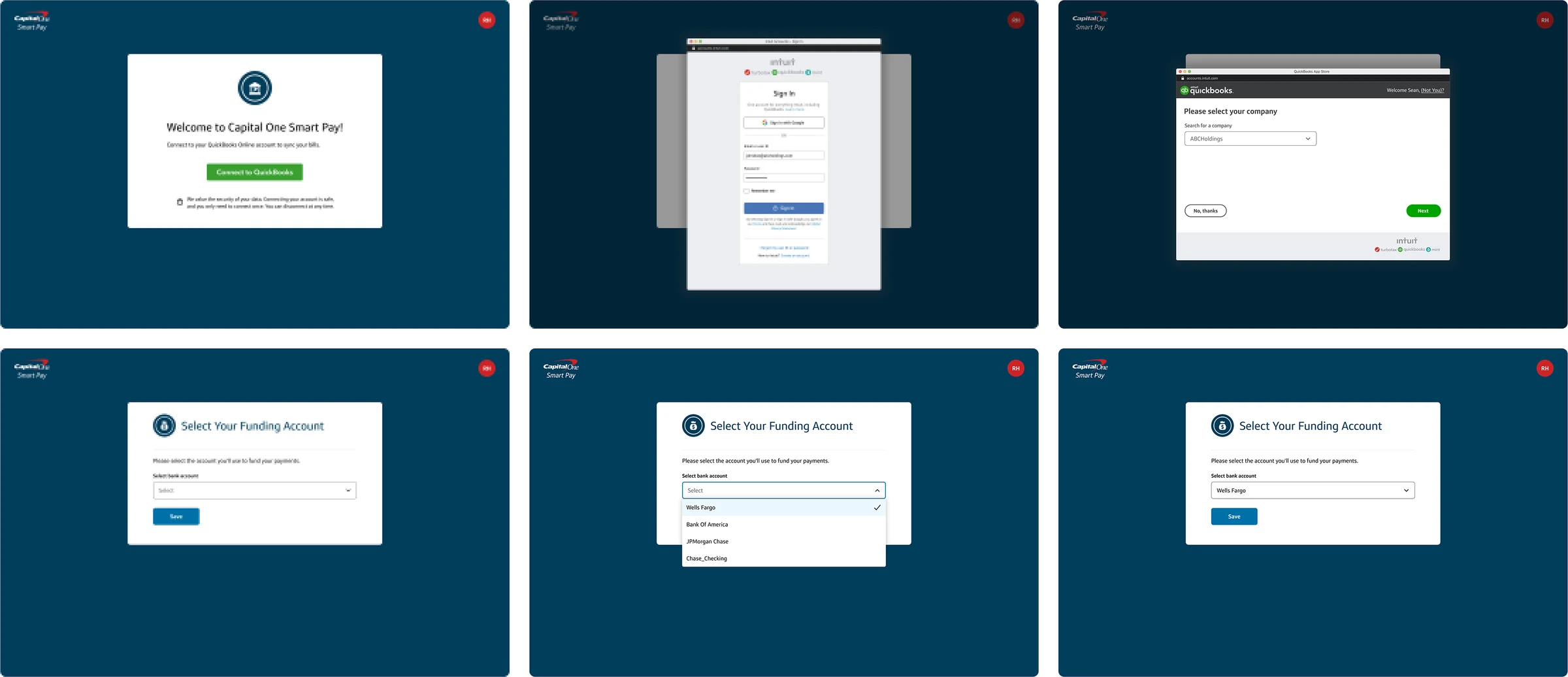
Onboarding: connect to QuickBooks, sign in with Intuit, select a company, then select and save a funding account
Onboarding that connects QuickBooks and a bank account.Connect QuickBooks Online, choose the company, and select the funding account for payments.
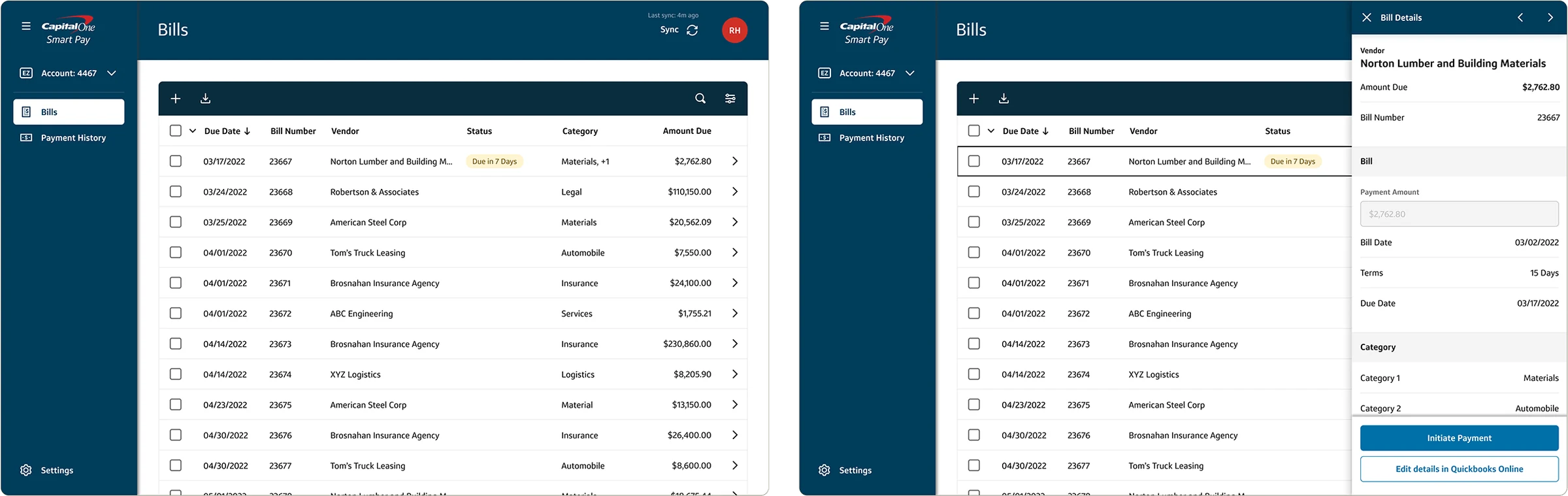
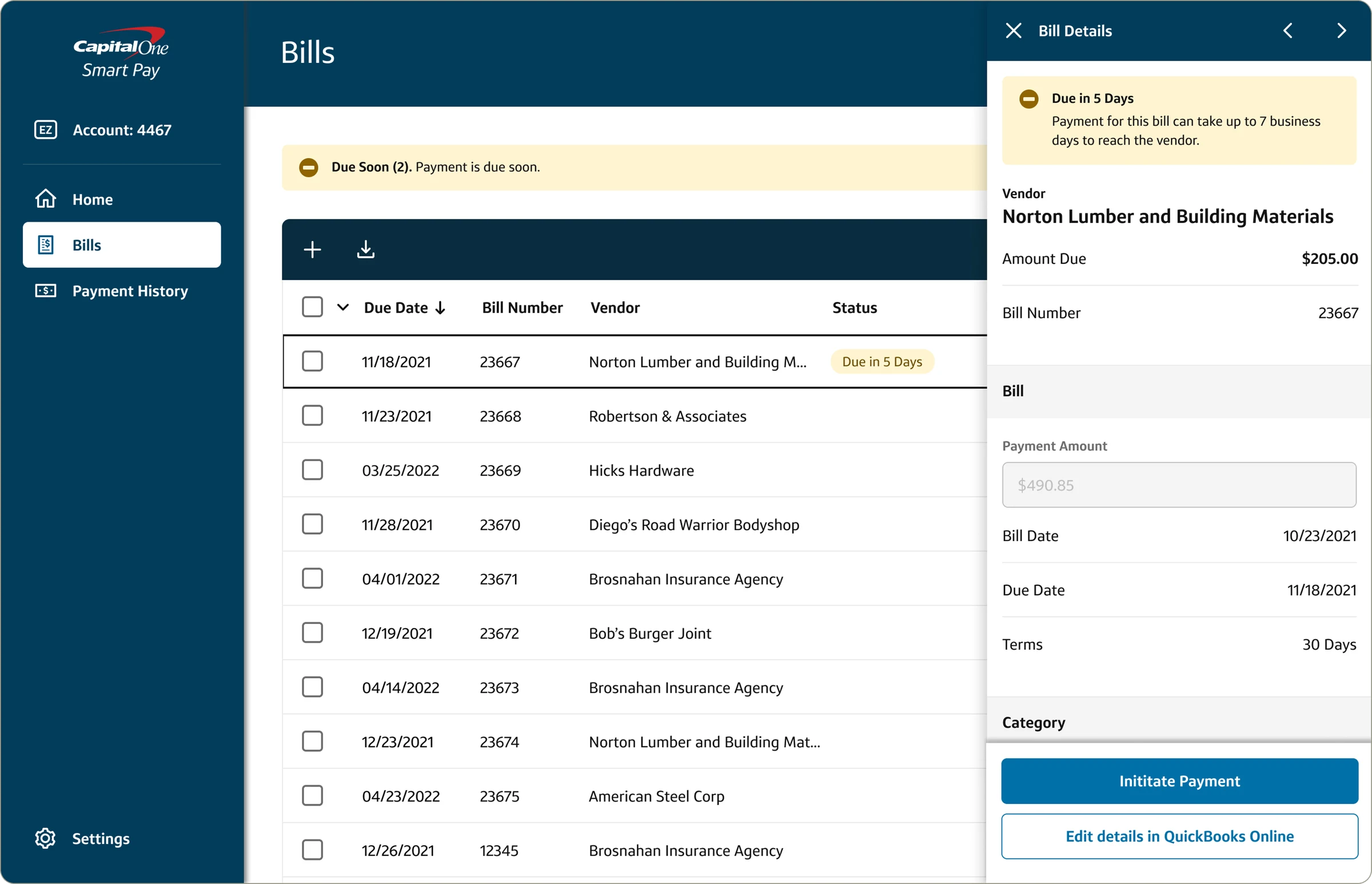
Bills table and the bill detail drawer with Initiate Payment and Edit details in QuickBooks Online
A single bill, paid from the table or the drawer.The drawer previews the bill in full, with a direct path to pay it or edit it in QuickBooks Online.
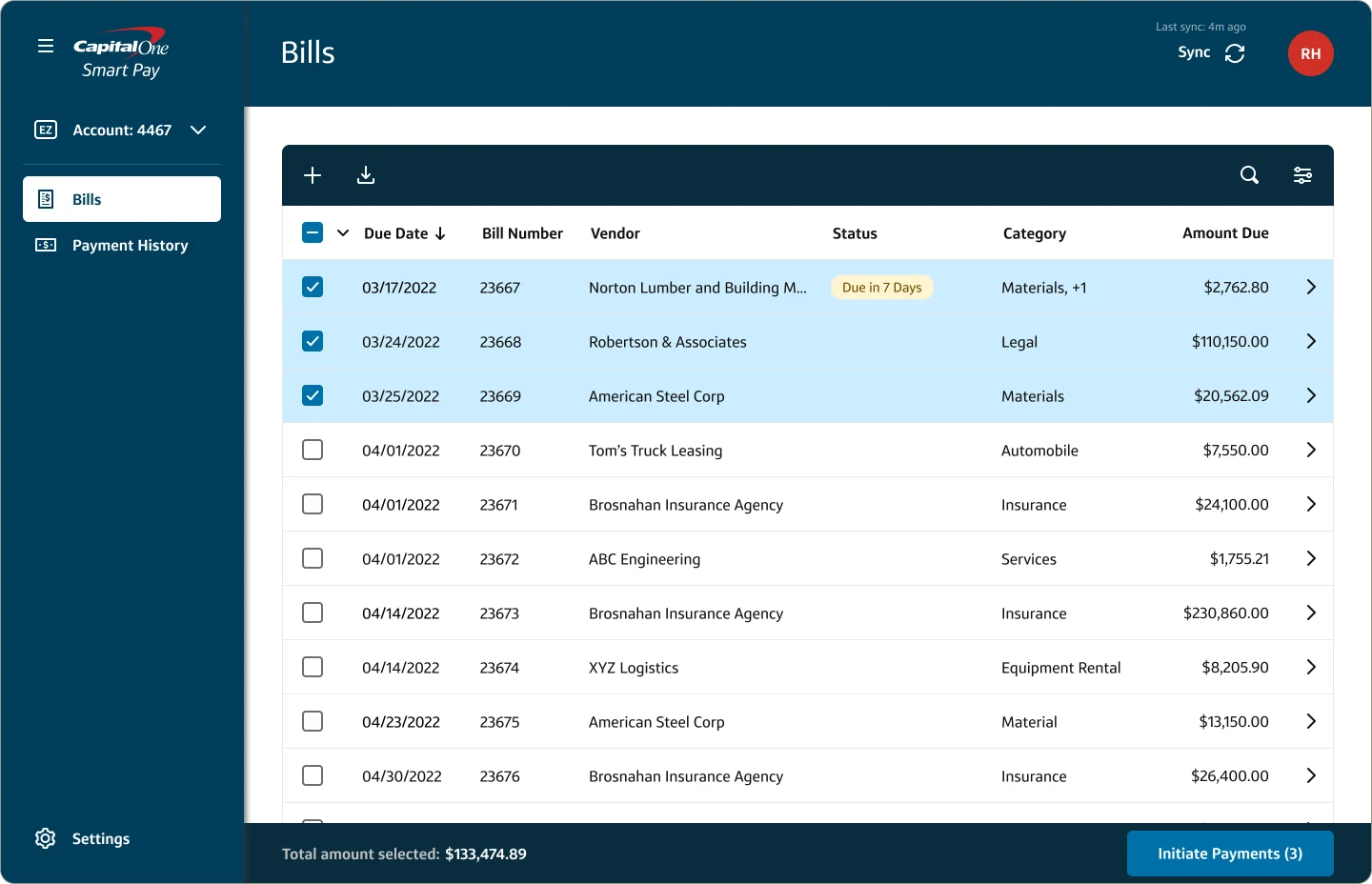
Bills table with three bills selected and Initiate Payments (3)

01Select bills

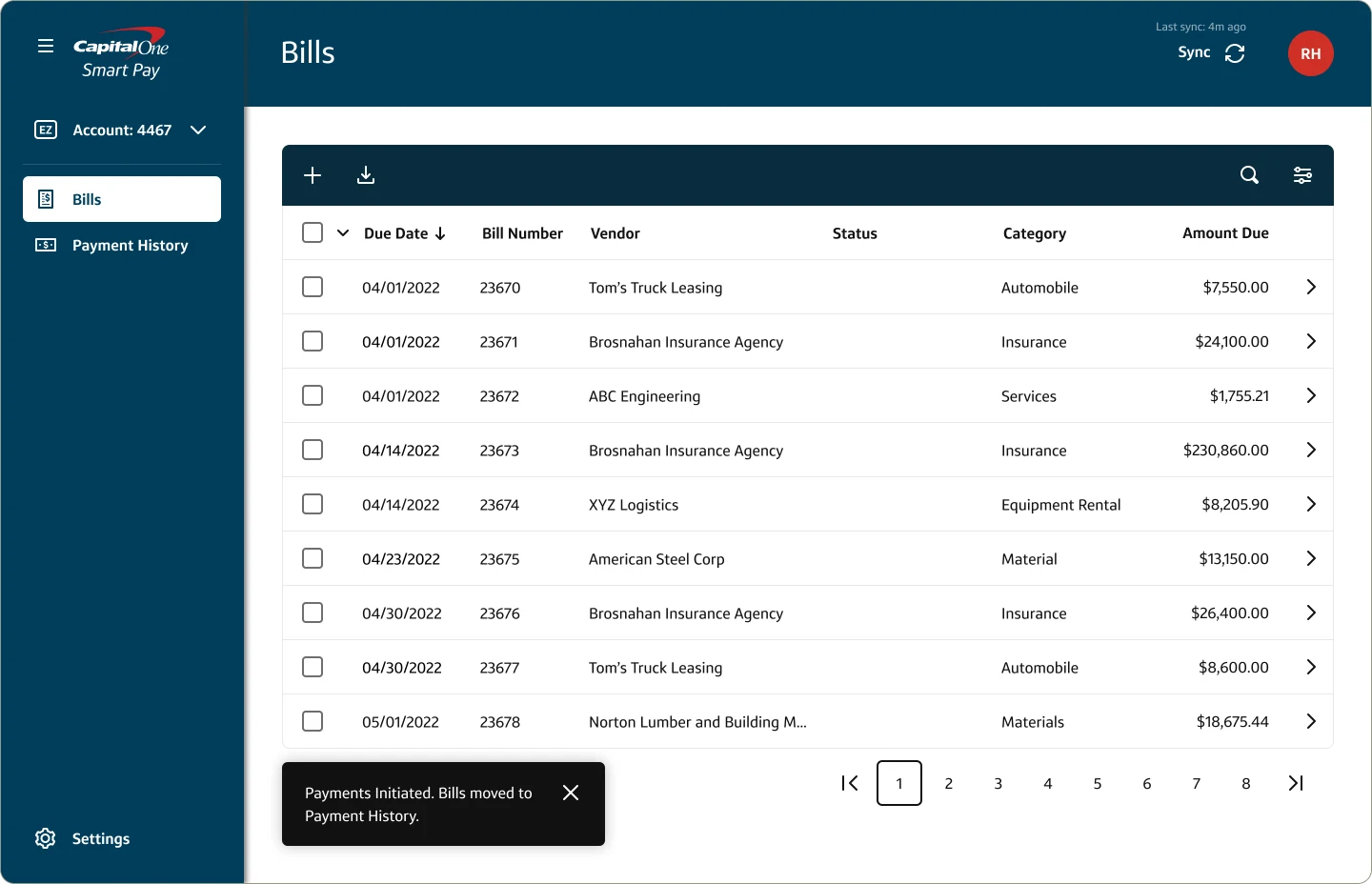
Bills table with a Payments Initiated toast

02Bills moved to Payment History

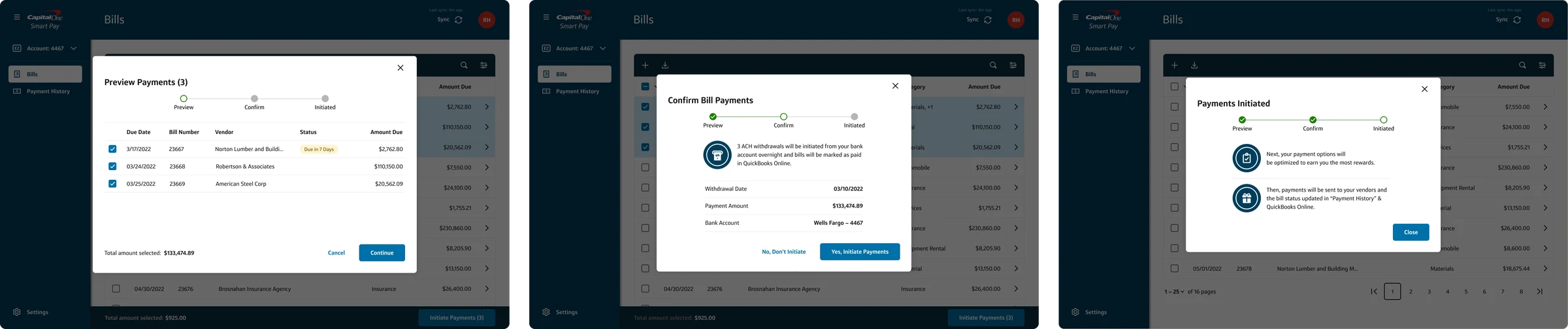
Three-step payment checkout: Preview, Confirm and Payments Initiated
Paying bills in three steps.Preview, Confirm, and Initiated: a running total keeps the amount clear, and a toast confirms the bills moved to Payment History.
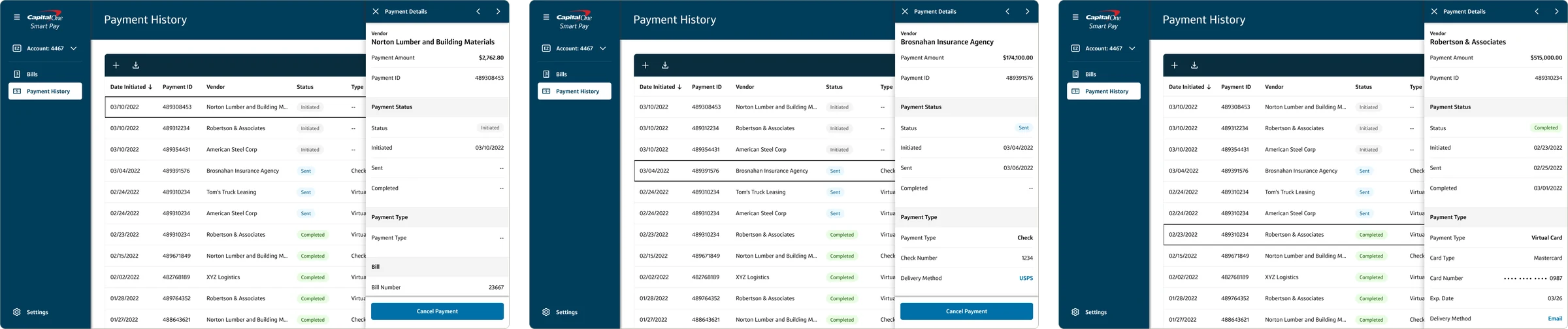
Payment History table with initiated, sent and completed statusesPayment detail drawers for an initiated, a sent and a completed payment
Every payment tracked by status.Payments move from Initiated to Sent to Completed, with dates for each step. The drawer shows the details, and payments can be cancelled until they’re completed.
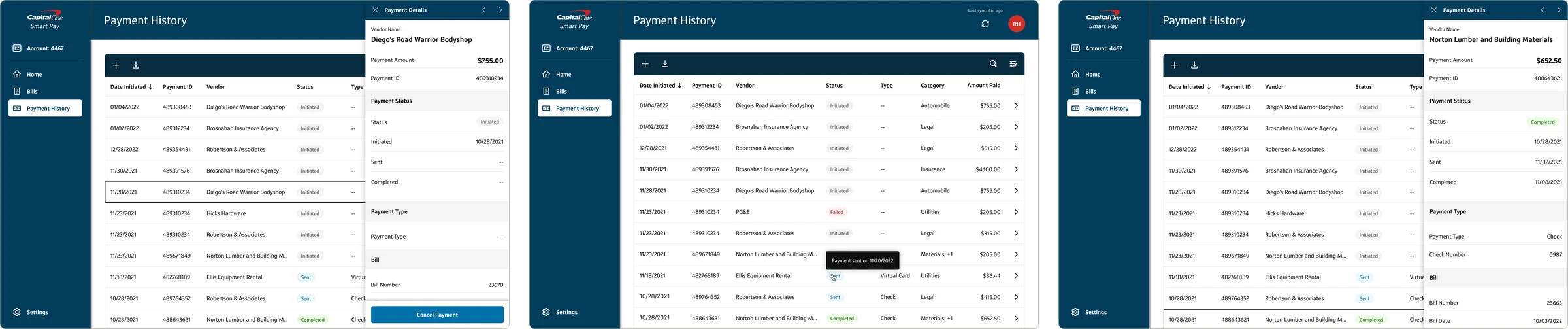
Payment History with initiated, failed and cancelled payments, a sent-date tooltip, and detail drawers
Statuses that explain themselves.Initiated, Sent, Completed, Failed, and Cancelled appear in both the table and the drawer, and hovering a status shows when it changed. When a status needs action, an alert in the drawer gives the details.

A tiered alert system

Alerts follow a clear hierarchy across three levels, so critical issues are never missed and secondary ones never get in the way.

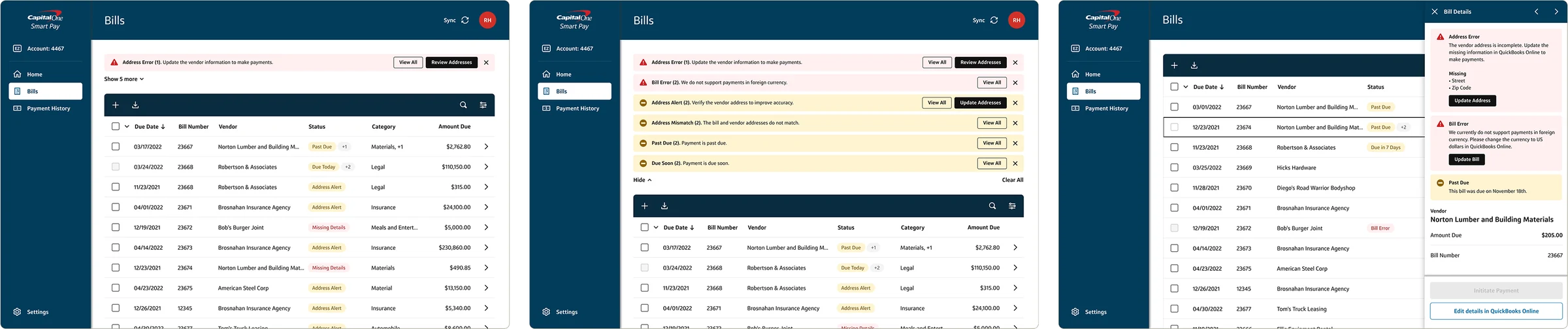
Bills with grouped alerts above the table, expanded alert list, status badges in the table, and detailed alerts in the drawer
Three levels: above the table, in the table, in the drawer.Grouped alerts summarize issues across bills, badges flag individual bills with a count for secondary issues, and the drawer gives the full detail with the action needed.
Bill with a Due in 5 Days badge, a Due Soon table alert, and the matching alert in the bill drawer
One bill, one message, at every level.A Due Soon alert above the table, a Due in 5 Days badge on the bill, and the reason in the drawer, with the payment action right below.

Status hierarchy

When a bill has more than one issue, the most critical one leads. Errors that block payment come first, then warnings.

  1. Address Error
  2. Bill Error
  3. Address Alert
  4. Address Mismatch
  5. Past Due
  6. Due Soon

Payments follow a lifecycle, with cancellation available until a payment completes.

  1. Initiated
  2. Sent
  3. Completed

Impact

7 months to launchFrom kickoff to MVP launch in August 2022, two months ahead of the nine-month target,
with a team of about 140 people across Lola and Capital One
  • The prototype became a guide for future Capital One products
  • The interim design system influenced the next generation of Capital One’s UI

Reflections

The Smart Pay launch was a key milestone in my career, and a chance to drive product innovation in B2B payments. It reinforced how much user testing, iteration, and cross-functional collaboration matter when delivering on a tight deadline.

  • Frequent testing refined the product and raised the experience.
  • Creative problem-solving led to a streamlined, scalable design despite tight constraints.
  • The team stayed agile and focused on user needs as things changed.
  • Collaboration between the Capital One and Lola teams made the ambitious goals possible.
  • The interim design system improved UI quality while reducing engineering complexity.